How to Fix Claude AI Rate Exceeded Error While Uploading Files
Error Updated on : April 10, 2026The Claude AI rate exceeded error is one of the most commonly reported issues by both free and Pro users. Imagine you are in the middle of analyzing a PDF, uploading a document, or running a complex prompt, and then Claude AI stops you cold with a “rate exceeded” error. Frustrating, right? But don’t you worry because it is a fixable and, most of the time, preventable event.
Let’s help you understand exactly why the error happens, what triggers it during file uploads, and give you actionable fixes, whether you are a casual user or a developer building on top of Claude’s API.
Quick Answer: The Claude AI rate exceeded error occurs when you have consumed your allocated token or request quota within a specific time window. File uploads are especially trigger-prone because they convert to tokens, often consuming large chunks of your limit in a single interaction. The fix is to wait out the cooldown period, reduce file size, or upgrade your plan.
What Is Claude AI?
Claude AI is a large language model (LLM) developed by Anthropic, an AI safety company. It competes directly with OpenAI’s ChatGPT and Google’s Gemini, and is widely praised for its ability to handle long-context documents, nuanced reasoning, and careful, thoughtful responses.
Claude is available through:
- Claude.ai: the consumer-facing web and mobile app (Free, Pro, and Team plans)
- Anthropic API: for developers building applications
- Claude for Enterprise: for organizations needing higher limits and compliance features
What makes Claude stand out is its large context window, which is up to 200,000 tokens in the latest models, making it ideal for analyzing long documents, legal contracts, codebases, and research papers. But that power comes with usage limits, and those limits are where the rate exceeded error lives.
What Does “Rate Exceeded” Mean in Claude AI?
The Claude AI rate exceeded error means you have hit a usage boundary set by Anthropic and Claude has temporarily stopped processing your requests until the limit resets.
There are two types of limits:
- Spend Limits
- Rate Limits
And the rate limits depend on your user tier and can be measured in three ways:
- Requests per minute (RPM)
- Input tokens per minute (ITPM)
- Output tokens per minute (OTPM)
When you exceed any one of these, Claude responds with an error. On the API, this appears as an HTTP 429 status code. On claude.ai, you will see a warning message telling you to wait or upgrade.
Why File Uploads Trigger Rate Limit Errors?
File uploads are one of the most common triggers for the Claude AI rate exceeded error, and here’s exactly why.
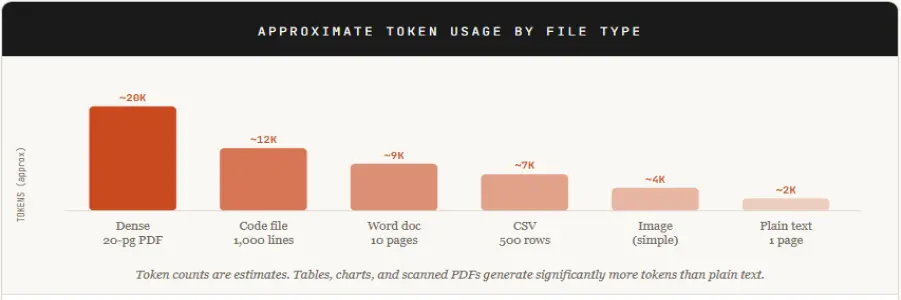
When you upload a file to Claude (a PDF, Word doc, CSV, image, or code file), Claude processes uploaded files by converting them into tokens. It converts the entire content into tokens before processing. Every word, every sentence, every character in that file becomes part of your input token count.
Claude’s limits are dynamic and depend on system usage, model demand, and your plan. Free users typically encounter stricter limits during high usage. A single large file upload followed by a detailed analysis prompt can eat through a significant portion of that budget in one shot.
If you have uploaded multiple files in a session, or if you are in a long conversation where Claude maintains context, those tokens stack up fast.
Common Causes of Claude AI Rate Exceeded Error While Uploading Files
Understanding what triggers the error puts you in control. Here are the most frequent culprits:
1. Large file uploads with dense content
PDFs with tables, charts, or dense text generate far more tokens than expected. A 20-page financial report can easily hit 15,000-20,000 tokens.
2. Multiple files uploaded in the same session
Each file adds to your token count. Uploading 5 files at once multiplies your usage and can exceed per-minute token limits immediately.
3. Long conversation history
Claude includes your full conversation history as context in every new request. A lengthy chat session means every new message carries the weight of everything said before, dramatically inflating token usage over time.
4. Rapid, repeated requests
Submitting prompts quickly, especially if regenerating responses, triggers requests-per-minute limits even when your total daily usage is within bounds.
5. Using Claude during peak hours
High server load periods can occasionally cause stricter rate enforcement or false triggers, particularly on the Free tier.
6. Free or basic plan limitations
Free users have significantly tighter limits than Pro or API users. Even moderate usage during a single session can push you to the edge.
7. API tier mismatches for developers
New API accounts start at Tier 1 with the lowest rate limits. Applications that fire multiple requests per minute quickly exceed those thresholds.
Quick Fixes to Solve Claude AI Rate Exceeded Error
Try these fast‑acting steps first when you see “Rate exceeded” after uploading a file. Most of them resolve the issue without restarting anything.
1. Pause and wait a few minutes
- Wait 5 to 10 minutes before retrying.
- Many rate‑limit windows reset within minutes, especially on lighter tiers.
2. Refresh the page or restart the app
- Close the Claude web tab and reopen it.
- On mobile, force‑quit the app and reopen.
This often clears temporarily stuck sessions.
3. Reduce the number of files per message
- If you uploaded 5+ files, try 1–2 files per prompt.
- Ask Claude for bullet‑point summaries, not full rewrites.
4. Shrink the file or upload only key sections
- Use a PDF/Word editor to remove redundant pages.
- Or copy and paste only the relevant text sections instead of the whole file.
5. Shorten your prompt
- Avoid long instructions like “rewrite everything in detail.”
- Use concise prompts such as:
- “Summarize this file in 5 bullet points.”
- “Extract action items from this report.”
6. Check your plan limits
- Log in to your Anthropic account and confirm your tier.
- If you are on Free, be aware that you may hit limits after a few file uploads.
Advanced Workarounds for Frequent Errors
If you hit rate limits regularly, these strategies will fundamentally change how you work with Claude.
1. Upload files in stages
Split large documents into logical sections. Upload and analyze one chunk at a time instead of a single giant file. This prevents both the per-minute ITPM spike and the context accumulation problem.
2. Pre‑process files before uploading
Extract only the important text with PDF or DOCX tools and paste it into Claude. Run Ctrl+F or regex filters to remove boilerplate, headers, and footers. This can reduce a file’s token footprint by 30 to 60%.
3. Use Claude Projects or Knowledge-base features (Pro/Team)
In Claude Projects, you can upload files to a persistent knowledge base indexed separately from your chat. This lets you analyze large file sets without hitting per-chat attachment limits.
4. Use external storage with RAG-style tools
Store large files in cloud storage (Google Drive, Dropbox, etc.) or AI-enabled platforms that support the Model Context Protocol (MCP). Let Claude access them via references rather than full uploads, sidestepping the 30 MB / 20-file per-conversation cap.
5. Switch to a multi-model UI (API users)
If you’re using Claude via your own API key through a third-party interface, you can configure fallback to another model (GPT, Gemini, etc.) when a 429 hits. This keeps your workflow moving without a manual pause.
6. Clear old chat history
Older file-based chats still carry context overhead in long conversations. Delete or archive old file uploads you no longer need to reduce token accumulation
For Developers – How to Handle Rate Limits Efficiently
If you are building on top of Claude’s API, rate limit management is a non-negotiable part of production-ready code. Here’s how to handle it properly.
1. Implement exponential backoff on 429 responses
When your API call returns HTTP 429, don’t immediately retry. Wait, then retry, then increase the wait time with each subsequent failure:
Connect from any client:
async function callWithBackoff(payload, maxRetries = 5) {
let delay = 1000; // start at 1 second
for (let attempt = 0; attempt < maxRetries; attempt++) {
const res = await fetch("https://api.anthropic.com/v1/messages", {
method: "POST",
headers: { "Content-Type": "application/json" },
body: JSON.stringify(payload)
});
if (res.status !== 429) return res;
const retryAfter = res.headers.get("retry-after");
const wait = retryAfter ? parseInt(retryAfter) * 1000 : delay;
console.warn(`Rate limited. Waiting ${wait}ms before retry ${attempt + 1}...`);
await new Promise(r => setTimeout(r, wait));
delay *= 2; // exponential backoff
}
throw new Error(“Max retries exceeded”);
}
2. Use Anthropic’s official rate limit headers
Claude’s API returns headers that tell you exactly where you stand before you hit the wall:
- anthropic-ratelimit-requests-remaining
- anthropic-ratelimit-tokens-remaining
- anthropic-ratelimit-requests-reset
- Right-size your max_tokens parameter
Setting max_tokens unnecessarily high reserves token capacity even if Claude doesn’t use it. Set your max_tokens to a realistic ceiling based on expected output length, not the maximum possible.
3. Use streaming for long responses
Streaming (stream: true) reduces the perceived wait time and can prevent timeout-related errors on long completions without affecting your actual token limit.
4. Count tokens before sending
Use Anthropic’s official /v1/messages/count_tokens endpoint to check your payload size before firing the full request. This lets you trim input proactively rather than getting a 429 after the fact:
Connect from any client:
// Count tokens BEFORE the real API call
const countRes = await fetch(“https://api.anthropic.com/v1/messages/count_tokens”, {
method: “POST”,
headers: { “Content-Type”: “application/json” },
body: JSON.stringify({
model: “claude-opus-4-20250514”,
messages: myMessages
})
});
const { input_tokens } = await countRes.json();
console.log(`This request will use ${input_tokens} input tokens`);
5. Upgrade your usage tier strategically
Anthropic’s API tiers scale from Tier 1 (entry level) to Tier 4 (high-volume production). Check your current limits at platform.claude.com/settings/limits and evaluate whether an upgrade is warranted based on your actual usage patterns.
6. Cache repeated context where possible
If your application sends the same system prompt or context document with every request, consider using Claude’s prompt caching feature. Cached tokens cost significantly less and don’t count toward rate limits in the same way as fresh input tokens.
Smart Workflow to Avoid Claude Rate Limit Errors
The best fix is prevention. Build these habits, and the rate of exceeding errors becomes rare.
- Use short sessions: Don’t let a single conversation grow indefinitely. After 15 to 20 exchanges, start a new chat. Long conversations silently inflate your token count with every message.
- Upload files in stages: Never upload more than one substantial file per session. If your work requires multiple documents, upload, extract what you need, note the output, then start a new chat for the next file.
- Keep prompts clean: Long-winded, repetitive prompts waste tokens. Front-load your most important instructions. Delete filler phrases. One clear sentence often outperforms three vague paragraphs.
- Monitor usage: On claude.ai, watch for the usage indicator that appears as you approach your limit; it’s a small but valuable early warning. For API users, log token usage per request in your application and set internal alerts before you hit 80% of your quota.
How Long Does Claude AI Rate Limit Last?
The duration of the Claude AI rate exceeded error depends on the type of limit you hit:
- Request limits (RPM): reset within seconds to minutes
- Token limits (ITPM/OTPM): usually reset within 1–5 minutes
- Free plan limits: may take longer during peak hours
If you are using the API, you can check the “retry-after” header to know exactly when to retry.
Claude AI vs ChatGPT – Handling Large Inputs
| Feature | Claude AI | ChatGPT (GPT-4o) |
| Max context window | 200,000 tokens | 128,000 tokens |
| File upload handling | Converts the full file to tokens | Summarizes/chunks internally |
| Rate limit on the free tier | Message-based daily cap | Request-based hourly cap |
| Retry behavior | Manual retry required | Sometimes auto-retries |
| Best for large documents | Yes, larger context | Truncates beyond 128K |
Note: ChatGPT may internally chunk or summarize large inputs depending on the model and interface
Key takeaway: Claude handles larger documents than ChatGPT but converts them to tokens more literally, which is why file uploads hit rate limits harder. ChatGPT’s internal chunking means it’s less likely to err on file uploads, but it may also miss content that falls outside its processing window. Claude gives you more but asks you to be smarter about how you use it. If the issue continues, it’s worth noting that similar problems occur across AI platforms. For instance, ChatGPT users also face response interruptions. Here’s a complete guide on how to fix the ChatGPT message stream error
Best Tools to Avoid Claude AI Rate Limits
If you are hitting rate limits regularly on claude.ai, these tools can extend your effective usage and give you more control.
1. PDF Splitter Tools (before uploading)
- Smallpdf.com – split PDFs by page range
- ilovepdf.com – free browser-based PDF splitting
- Adobe Acrobat – professional-grade document manipulation
2. Token Estimation Tools (before sending)
- OpenAI’s Tokenizer (tiktoken) – approximate token counts for Claude content
- Claude-tokenizer npm package – Claude-specific token estimation for developers
3. API Interface Tools: Using Claude via your own API key through a third-party interface gives you more flexibility than claude.ai, including the ability to switch models instantly, adjust max_tokens per request, and manage conversation history manually. This approach bypasses the claude.ai message caps and puts you on the API’s token-based billing model instead.
4. Workflow Automation Platforms: Tools like Zapier, Make (formerly Integromat), and n8n support Claude API integrations and allow you to build rate-limit-aware automations with built-in retry logic, queue management, and request throttling.
Conclusion
The Claude AI rate exceeded error is not a bug but a boundary. Anthropic built these limits to ensure the service remains stable and fair for everyone, from casual free-tier users to enterprise teams running production applications. But hitting that boundary doesn’t have to disrupt your work.
For most users, the fix is simple: split large files, start fresh conversations, and keep prompts focused. For power users and developers, investing time in retry logic, token monitoring, and smarter context management pays off in a smoother, more reliable workflow. If you consistently max out your limits, it’s worth running the numbers on a Pro plan or API access. At the scale most professionals work, the cost is easily justified by the productivity gain. If the issue continues even after trying all fixes, it may not be a rate limit problem. In that case, check our guide on Claude AI internal server error for deeper troubleshooting.
Frequently Asked Questions
Q1. Why does Claude AI show a rate exceeded error?
Ans. Claude AI shows a “rate exceeded” error when you exceed usage restrictions meant to preserve system stability and fair access. Common causes include continuous traffic, long prompts, fast consecutive requests, and exceeding daily quota limits on free or premium plans.
Q2. How does Claude count tokens?
Ans. Claude counts tokens by converting your input text into smaller units called tokens using its internal tokenizer. The model ID of the model you wish to count tokens against must be included in the request’s body.
Q3. What file size is safe?
Ans. A 30 MB file can work well for both uploads and downloads
Q4. Can I increase limits?
Ans. Yes, you can increase limits by:
- Upgrading from Free to the Claude Pro or Team plan
- Using the Anthropic API and moving to higher usage tiers (Tier 2 to 4)
- Requesting limit increases via your account dashboard
Higher tiers provide significantly better rate limits and token capacity.
Q5. Why does the error occur even with small files?
Ans. It can happen because your existing conversation history might have already consumed the tokens, you may have hit requests-per-minute limits, not token limits, prompt bombing, or traffic load on the site.

manvinder Singh
https://www.hostingseekers.com
Manvinder Singh is the Founder and CEO of HostingSeekers, an award-winning go-to-directory for all things hosting. Our team conducts extensive research to filter the top solution providers, enabling visitors to effortlessly pick the one that perfectly suits their needs. We are one of the fastest growing web directories, with 500+ global companies currently listed on our platform.