How Do I Contact Hostinger Customer Service? (2026)
IT Updated on : October 2, 2026If you are using Hostinger and run into issues such as billing problems, website errors, domain connection issues, or online store setup, contacting the right support channel is essential. Here, you will learn how to contact Hostinger customer support.
We will discuss different methods, including live chat, email support, WhatsApp, and the official help center. You will also get to know Hostinger’s contact information and alternative ways to get assistance quickly.
💡
Quick Answer
How Do I Contact Hostinger Customer Service?
Hostinger does not offer phone support. The fastest way to reach Hostinger customer service is through 24/7 Live Chat after logging into your account. You can also contact support via email.
Hostinger Quick Contact Options
- 💬 Live Chat: Available 24/7
- 📧 Email: support@hostinger.com
- 📱 WhatsApp: +1 659 444 4429
- 📚 Knowledge Base: support.hostinger.com
- 🌐 Website: www.hostinger.com
- 🎓 Tutorials: hostinger.com/tutorials
Hostinger Live Chat Support
| Support Channel | Details |
|---|---|
| Live Chat | Available 24/7 |
Hostinger Email Support Contacts
| Department | Contact |
|---|---|
| General Support | support@hostinger.com |
| Sales & Product Inquiries | sales@hostinger.com |
| General Information / Outreach | info@hostinger.com |
| Abuse Reports | abuse@hostinger.com |
| Media & News | press@hostinger.com |
Hostinger Contact Numbers
| Contact Type | Details |
|---|---|
| Phone Number | Not Available |
| +1 659 444 4429 |
Hostinger Policies & Legal Documents
| Policy | Official Link |
|---|---|
| Privacy Policy | https://www.hostinger.com/legal/privacy-policy |
| Refund Policy | https://www.hostinger.com/legal/refund-policy |
| Security Policy | https://www.hostinger.com/legal/security-policy |
| Customer Service Policy | https://www.hostinger.com/legal/customer-service-policy |
| Terms of Service | https://www.hostinger.com/legal/universal-terms-of-service-agreement |
Hostinger Help Center & Tutorials
| Resource | Official Link |
|---|---|
| Knowledge Base | https://support.hostinger.com/ |
| Tutorials | https://www.hostinger.com/tutorials/ |
| How to Make a Website | https://www.hostinger.com/tutorials/how-to-make-a-website |
| Hostinger Pricing | https://www.hostinger.com/pricing |
| Compare Hostinger Plans | https://www.hostinger.com/pricing#compare-table |
| Hostinger Horizons | https://www.hostinger.com/horizons |
| Website Builder | https://www.hostinger.com/website-builder |
| AI Website Builder | https://www.hostinger.com/ai-website-builder |
| Hostinger API | https://developers.hostinger.com/ |
| Account Recovery | https://auth.hostinger.com/account-recovery |
| Blog | https://www.hostinger.com/blog/ |
| Affiliate Program | https://www.hostinger.com/affiliates |
| Hostinger Reviews | https://www.hostinger.com/reviews |
| Roadmap | https://roadmap.hostinger.com/tabs/9-horizons |
| Wikipedia | https://en.wikipedia.org/wiki/Hostinger |
Hostinger Social Media Platforms
| Platform | Official Profile |
|---|---|
| https://www.linkedin.com/company/hostinger | |
| https://www.facebook.com/Hostinger | |
| https://www.instagram.com/hostinger_global | |
| X (Twitter) | https://x.com/Hostinger |
| YouTube | https://www.youtube.com/@Hostinger |
| https://www.reddit.com/r/Hostinger/ | |
| TikTok | https://www.tiktok.com/@hostingeracademy |
How to Contact Hostinger via Live Chat?
To contact Hostinger via live chat, you need to have a Hostinger account. If you have an account with Hostinger, follow these steps to contact Hostinger’s live chat support:
1. Go to Hostinger’s website.
2. Click Log In in the top right corner of the page.
3. Log in to your account using your credentials.
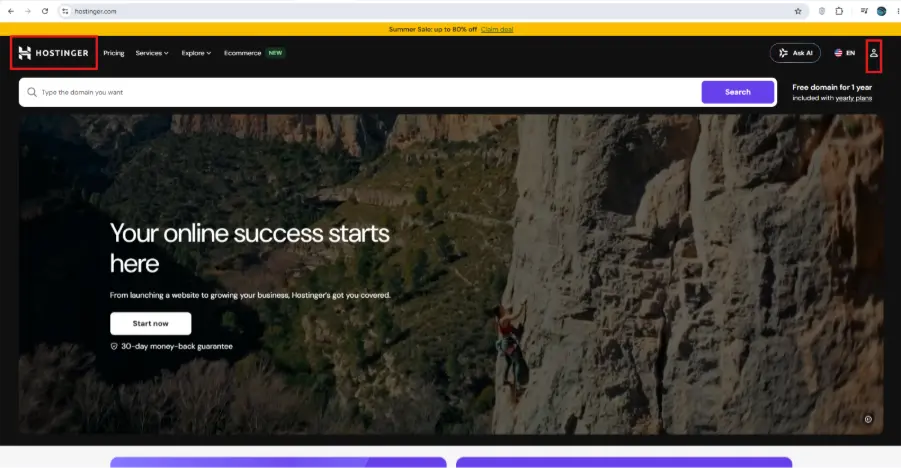
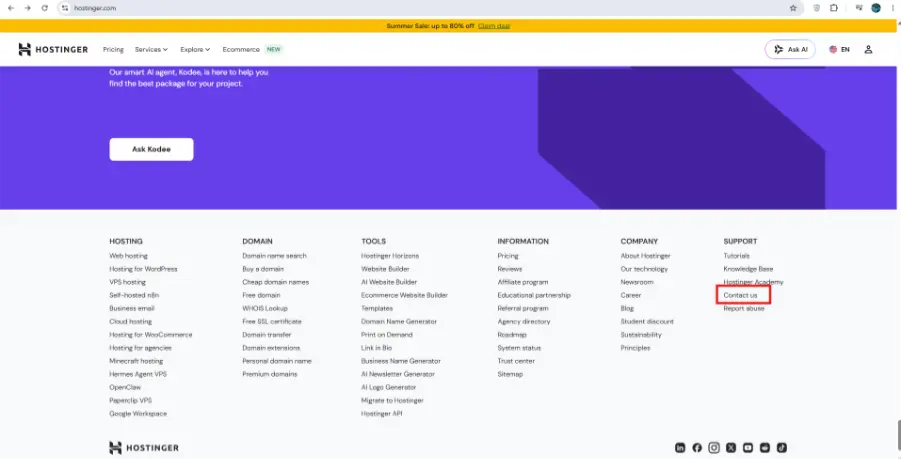
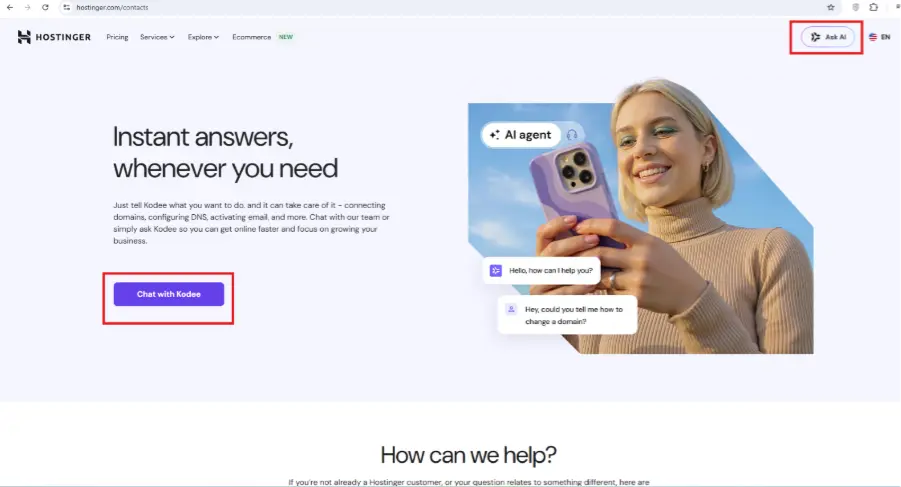
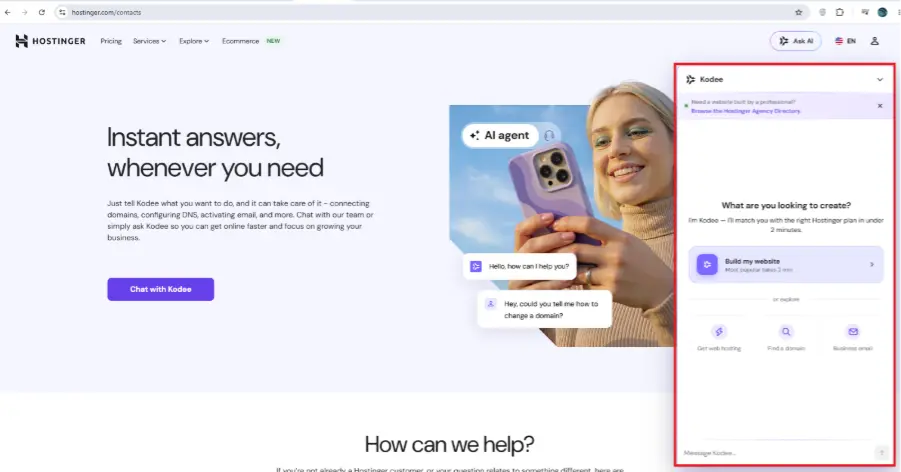
4. Once logged in, click on the “Contact Us” page.
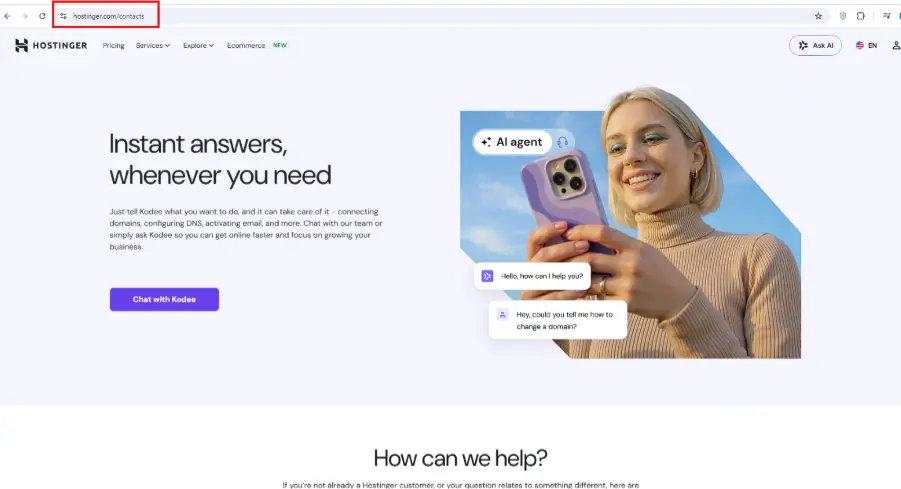
5. Now either click on “Chat With Kodee” or click on the “Ask AI” option at the top right corner of the Contact Us page.
Without a Hostinger Account?
If you don’t have a Hostinger account, you can explore their Contacts page for more options.
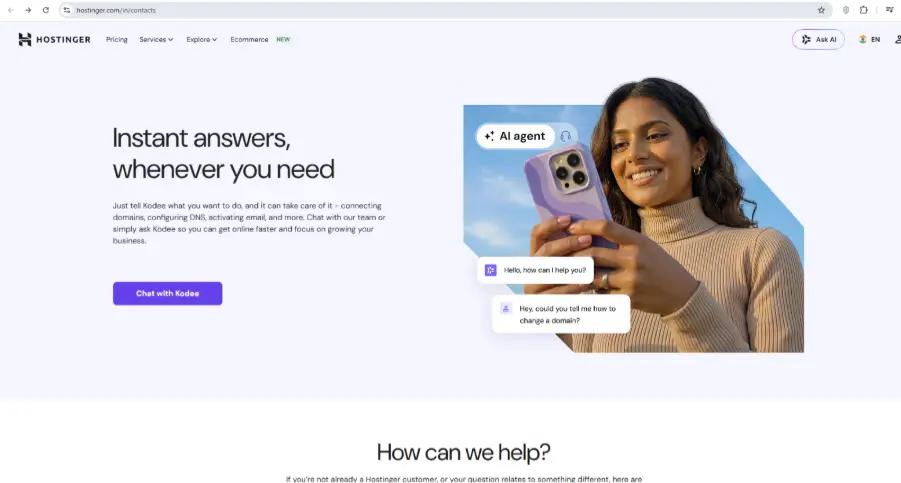
Or, you can email the Hostinger support team at support@hostinger.com.
Alternatively, you can also book a call with a sales expert for sales-related inquiries.
How to Get Hostinger Email Addresses
Hostinger offers the following email support for different purposes:
1. Visit the Hostinger website.
2. Scroll down to the footer of the website and click on Contact us.
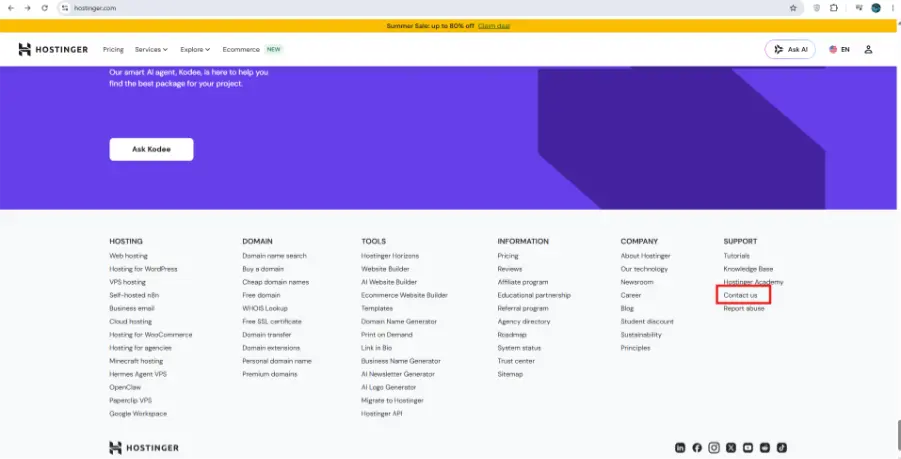
3. On the Contact Us page, you will find the email support channels under the “How can we help?” section.
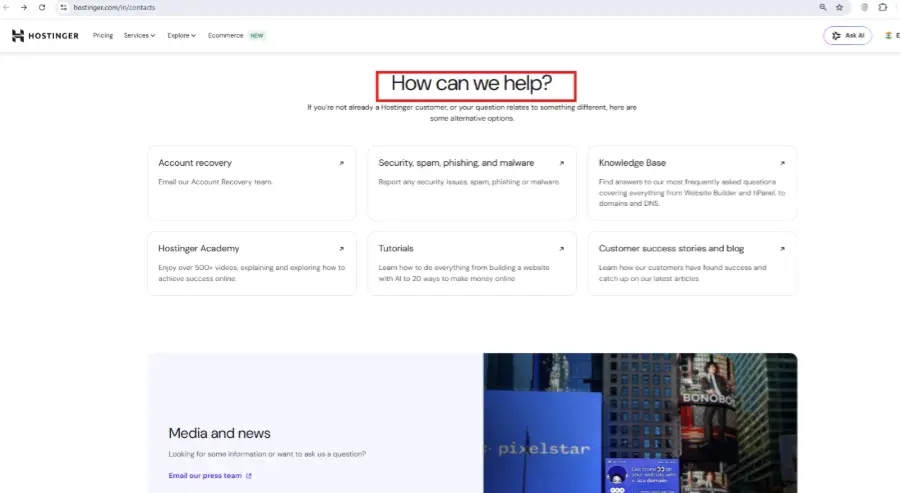
Does Hostinger Have a Phone Number?
No, Hostinger does not offer phone support. Support is handled entirely online through 24/7 live chat and email, which lets the team collect screenshots and error details for faster, more accurate troubleshooting.
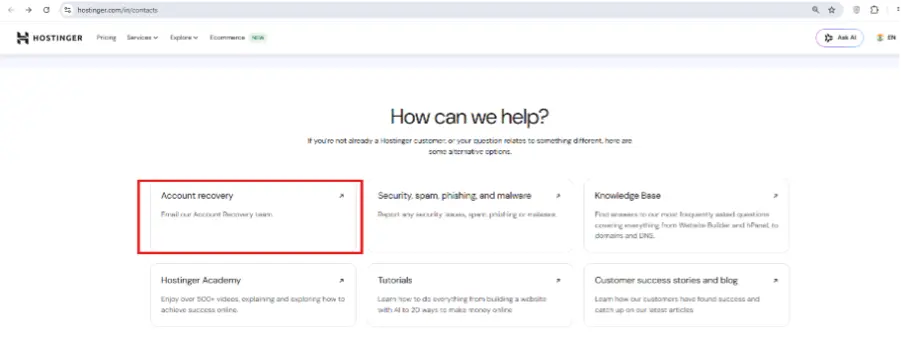
Account Recovery
The Hostinger Account Recovery page helps you securely regain access to your account if you are unable to log in. It guides you through verifying your identity and provides recovery options to restore access to your account safely.
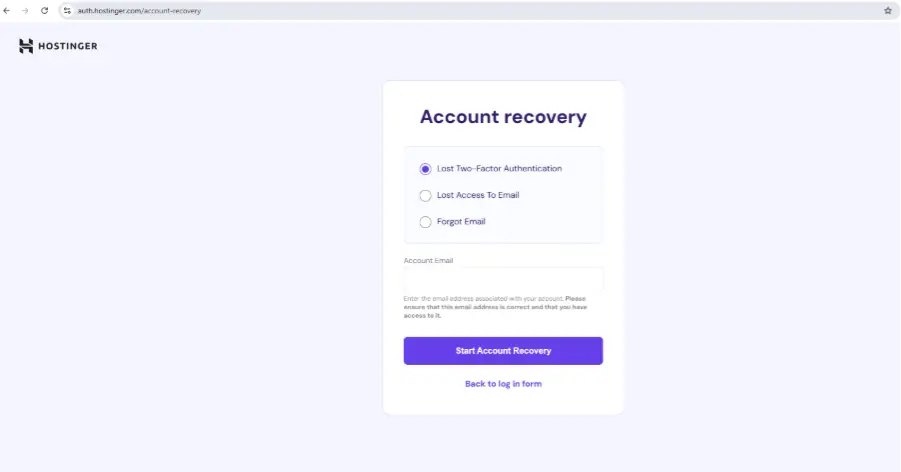
Through this page, you can select the reason for account recovery and can start recovering your account.
About Hostinger
Hostinger is a global web hosting and website solution provider founded in 2004 as Hosting Media and rebranded to Hostinger in 2011. It serves over 4 million clients with hosting, AI website-building tools, domain registration, and an easy-to-use control panel. If you’re considering Hostinger as your web hosting provider, read our Hostinger Hosting Review to explore its pricing, performance, uptime, features, pros & cons, and real user experience before making a decision.
Hostinger Company Information
| Information | Details |
|---|---|
| Founded | 2004 (as Hosting Media), rebranded to Hostinger in 2011 |
| Chairman | Arnas Stuopelis, Chairman of the Board |
| CEO | Daugirdas Jankus |
| Subsidiaries | Hosting24, Niagahoster |
Hostinger Headquarters & Office Locations
| Country | City | Office Address |
|---|---|---|
| Lithuania | Kaunas | Jonavos g. 60C (Headquarters) |
| Cyprus | Larnaca | Lordou Vyronos 61 |
| Lithuania | Vilnius | Jono Basanavičiaus g. 26 |
Pros & Cons of Hostinger
| ✅ Pros | ❌ Cons |
|---|---|
| 24/7 Live Chat Support | No Phone Support |
| Multilingual Customer Support | Login Required to Access Live Chat |
| Extensive Self-Service Knowledge Base | Email Response Times May Vary |
| WhatsApp Support for Sales & Onboarding | Limited Direct Contact Channels |
Best Alternative Options to Hostinger
- HostGator: Reliable shared, VPS, dedicated server, and hosting for WordPress with domain registration and website-building tools.
- SiteGround: Premium hosting known for speed, security, and strong customer support, including managed WordPress and cloud hosting.
- InMotion: High-performance shared, VPS, dedicated, and hosting for WordPress focused on speed, scalability, and support.
- Hosting.com: Fast, secure shared, VPS, dedicated, and managed hosting for WordPress with developer-friendly features.
- DreamHost: Trusted hosting provider offering domain registration, cloud services, VPS, dedicated servers, and website tools.
Summing Up
Hostinger makes customer support simple by offering 24/7 live chat, dedicated email support, account recovery tools, and an extensive Help Center. While it does not provide phone support, its live chat remains the fastest and most effective way to get assistance. For users who prefer solving issues on their own, Hostinger’s knowledge base, tutorials, and step-by-step guides provide reliable self-service resources for everything from account management to website troubleshooting. If you’re planning to purchase hosting, don’t forget to check our Hostinger Coupons to save on your order. You can also read our detailed Hostinger Hosting Review to learn more about its performance, pricing, features, pros and cons, and real user experience before making a decision.
Frequently Asked Questions
Q1. How can I contact Hostinger customer support?
Ans. You can contact Hostinger customer support through 24/7 live chat after logging into your Hostinger account. You can also reach the support team via email or browse the Help Center for self-service assistance.
Q2. Does Hostinger have a customer service phone number?
Ans. No. Hostinger does not provide phone support. Instead, it offers 24/7 live chat, email support, WhatsApp assistance for sales inquiries, and a comprehensive knowledge base.
Q3. What is the fastest way to contact Hostinger support?
Ans. The fastest way to get help is through Hostinger’s 24/7 live chat. It allows you to communicate directly with the support team, share screenshots and error messages, and receive real-time assistance.
Q4. How long does Hostinger support take to respond?
Ans. Live chat responses are typically immediate or within a few minutes, while email response times may vary depending on the complexity of your request and support volume.
Q5. Does Hostinger provide 24/7 customer support?
Ans. Yes. Hostinger offers 24/7 customer support through its live chat service, ensuring assistance is available whenever you need it.
Q6. Can I contact Hostinger without logging into my account?
Ans. Yes. If you don’t have access to your account, you can contact Hostinger via email, use the Account Recovery page to regain access, or book a call with a sales expert for pre-sales inquiries.
Q7. Does Hostinger provide email support?
Ans. Yes. Hostinger offers multiple email addresses for different purposes, including general support, sales, abuse reports, media inquiries, and general information.
Q8. How can I reset my Hostinger account password?
Ans. You can reset your password by visiting the Hostinger login page and selecting the Forgot Password option, then following the verification instructions sent to your registered email address.
Q9. How do I recover my Hostinger account if I can’t log in?
Ans. Visit the Hostinger Account Recovery page, choose the reason for recovery, verify your identity, and follow the on-screen instructions to restore access to your account.
Q10. Can I request a refund through Hostinger customer support?
Ans. Yes. You can contact Hostinger’s support team via live chat or email to request a refund, provided your purchase meets the eligibility requirements outlined in Hostinger’s Refund Policy.
Q11. Does Hostinger offer support for WordPress users?
Ans. Yes. Hostinger provides support for Hosting for WordPress issues through live chat, tutorials, and its extensive knowledge base.

manvinder Singh
https://www.hostingseekers.com
Manvinder Singh is the Founder and CEO of HostingSeekers, an award-winning go-to-directory for all things hosting. Our team conducts extensive research to filter the top solution providers, enabling visitors to effortlessly pick the one that perfectly suits their needs. We are one of the fastest growing web directories, with 500+ global companies currently listed on our platform.