Wildcard SSL vs Standard SSL: What’s the Difference & Which One Should You Choose?
Comparison Updated on : December 12, 2025Table of Content
- Wildcard SSL vs Standard SSL: Comparison Table
- What Is a Standard SSL Certificate?
- What Is a Wildcard SSL Certificate?
- Wildcard SSL vs Standard SSL: Key Differences
- Which SSL Certificate Should You Choose?
- How to Install Standard vs Wildcard SSL
- Common SSL Errors & How to Fix Them
- Conclusion
- Frequently Asked Questions (FAQs)
SSL is required for all websites in order to meet browser requirements and protect users. But not every certificate is built in the same way.
Approximately 87.6% of websites have a valid SSL certificate as of 2025, and 88.08% of websites are currently using the HTTPS protocol. This change highlights the importance of SSL for security, user confidence, and search engine optimization. Google prioritizes secure websites in search results and pushes unencrypted sites lower in the rankings by treating HTTPS as a ranking signal.
But which certificate type is right for your business? This guide breaks down the key differences to help you make an informed decision.
Comparison Table: Wildcard SSL vs Standard SSL
| Feature | Standard SSL | Wildcard SSL |
| Domain Coverage | 1 primary domain + WWW & non-WWW | 1 domain + unlimited first-level subdomains |
| Subdomain Support | No | Unlimited (*.example.com) |
| Starting Price | $30-60/year | $45-150/year |
| Validation Level | DV, OV, EV | DV, OV |
| Warranty | $500K-$1.25M | $1.5M-$2M |
| Installation Complexity | Simple | Moderate |
| Scalability | Limited | Excellent |
| Best For | Single websites, blogs | Multiple subdomains, growing businesses |
What Is a Standard SSL Certificate?
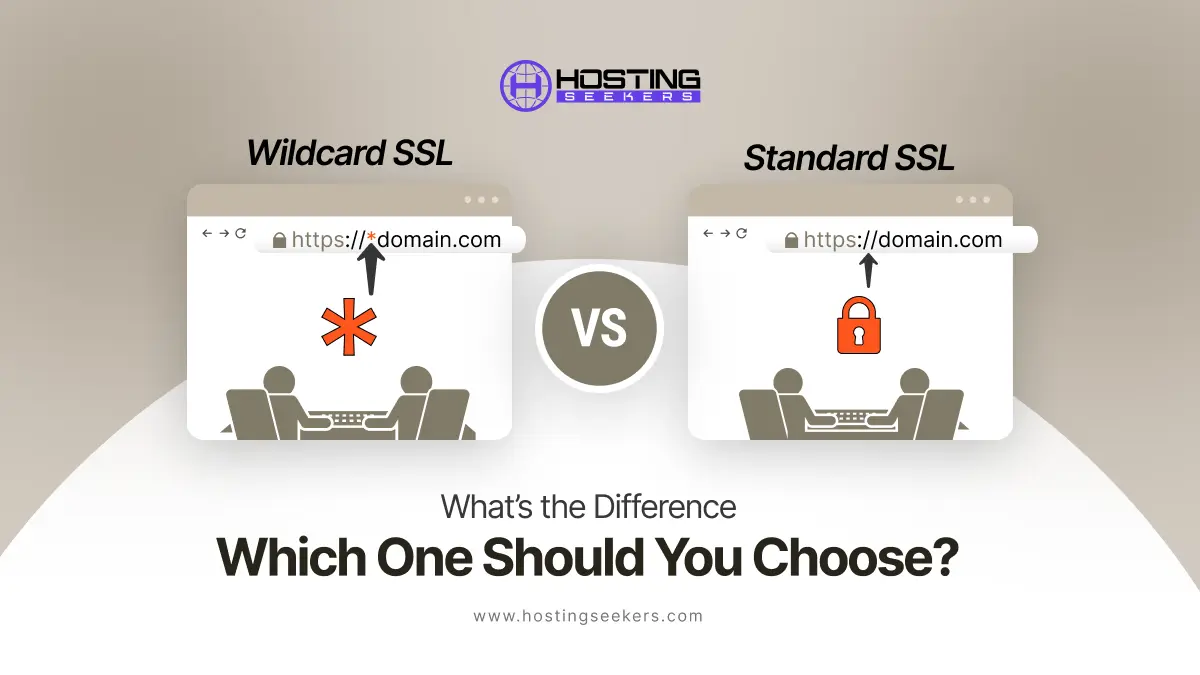
A Standard SSL certificate, also called a Single Domain SSL, secures only one primary domain and its variations (www and non-www versions). For example, if you buy a Standard SSL for example.com, it will automatically protect both www.example.com and example.com, but it won’t cover any subdomains like shop.example.com or blog.example.com.
Standard SSL represents the entry-level certificate option and is domain-validated (DV), meaning the Certificate Authority only verifies your ownership of the domain without extensive business verification.
The entry-level SSL certificate option is domain-validated (DV), which means that the Certificate Authority only confirms your domain ownership without conducting thorough business verification.
How Standard SSL Works
Standard SSL operates through a straightforward encryption mechanism:
- Domain Ownership Verification: The CA verifies you control the domain by checking DNS records or email validation
- Certificate Issuance: Once verified, the CA issues a 2048-bit RSA key with 256-bit encryption strength
- Installation: The certificate is installed on your web server
- Encryption: All data transmitted between the user’s browser and your server is encrypted using TLS 1.2 or higher
- Browser Recognition: Visitors see a padlock icon and “https://” in the address bar, confirming the connection is secure
This single-certificate approach requires no complex configuration, making it ideal for straightforward implementations.
When You Should Use Standard SSL
Standard SSL certificates are appropriate for:
- Single-domain websites with no subdomains
- Small businesses operating one main website
- Blogs and content sites with minimal infrastructure
- E-commerce sites with a single storefront
- Portfolio websites maintained by individuals or freelancers
- Websites prioritizing simplicity over scalability
If your website is straightforward and you don’t plan to add subdomains, Standard SSL provides all the protection you need.
Advantages of Standard SSL
- Lower Cost: Starting at $30-60/year, Standard SSL is more affordable than Wildcard options. Free options exist via Let’s Encrypt, and budget resellers offer them for as low as $4-$8 per year.
- Fast Issuance: Can be issued in minutes to hours through automated domain verification
- Easy Installation: Straightforward setup with most hosting providers
- Sufficient Encryption: Provides 256-bit encryption and 2048-bit RSA keys
- Browser Compatibility: Works across 99.99% of modern browsers and devices
- SEO Benefits: Signals security to Google’s ranking algorithm
Limitations of Standard SSL
- Single Domain Only: Cannot protect subdomains (blog.example.com, shop.example.com)
- No Scalability: Requires purchasing additional certificates if you add subdomains
- Limited Validation: Domain validation only; doesn’t verify business legitimacy
What Is a Wildcard SSL Certificate?
A Wildcard SSL certificate secures one primary domain and an unlimited number of first-level subdomains with a single certificate. It is represented by an asterisk () in the domain name (.example.com) and protects all subdomains you add during its validity period, both current and future.
For instance, a Wildcard SSL for *.example.com covers:
- example.com (root domain)
- www.example.com
- blog.example.com
- shop.example.com
- account.example.com
- support.example.com
- And any other first-level subdomains you create
How Wildcard SSL Works
Wildcard SSL certificates function similarly to Standard SSL but with expanded coverage:
- Domain Verification: The CA verifies ownership of *.example.com
- Wildcard Configuration: The certificate is issued with wildcard notation, covering all first-level subdomains
- Private Key Distribution: The same private key is shared across all subdomains and servers
- Encryption: All subdomains receive 256-bit encryption through TLS 1.2 or higher
- Auto-Coverage: Any new subdomains created automatically fall under certificate protection
The shared private key approach simplifies management but introduces considerations regarding key security and distribution.
When You Should Use Wildcard SSL
Wildcard SSL certificates are ideal for:
- Medium to large businesses with multiple service areas
- Multi-service platforms (blog, shop, support, API, etc. as subdomains)
- Growing companies planning to add subdomains frequently
- Enterprise environments hosting multiple applications on subdomains
- API services requiring multiple endpoint subdomains
- Cost-conscious teams with 5+ subdomains
If you’re adding subdomains beyond the initial launch or scaling your digital infrastructure, Wildcard SSL provides high cost and management advantages.
Advantages of Wildcard SSL
- Unlimited Subdomain Coverage: Protect unlimited first-level subdomains with one certificate
- Cost-Effective Scaling: Saves money compared to purchasing individual certificates (up to 83% savings with 20+ subdomains)
- Future-Proof: New subdomains are automatically protected without additional purchases
- Simplified Management: One certificate to renew and maintain instead of multiple
- Same Security Level: Offers identical 256-bit encryption strength as Standard SSL
- Higher Warranty: Typically includes $1.5M-$2M warranties vs. $500K-$1.25M for Standard SSL
- Flexible Validation: Available in both DV and OV validation levels
Limitations of Wildcard SSL
- First-Level Subdomains Only: Cannot protect second-level subdomains (sub.blog.example.com requires a separate multi-domain Wildcard certificate)
- Private Key Security Risk: The shared private key across multiple servers increases the compromise surface area; if one server is breached, all subdomains are vulnerable
- Single Domain Limitation: Cannot secure multiple root domains (example.com and example.org require separate certificates)
- Higher Initial Cost: More expensive than a single Standard SSL certificate
- Complex Key Management: Distributing the private key across multiple servers requires secure practices
- Limited Validation Options: Extended Validation (EV) is not available for Wildcard certificates as of 2025; only DV and OV options exist
Wildcard SSL vs Standard SSL: Key Differences
1. Coverage
Standard SSL protects a single domain (example.com and www.example.com only), while Wildcard SSL secures one domain plus unlimited first-level subdomains (*.example.com). This fundamental difference determines scalability.
2. Cost
Standard SSL starts at $30-60/year, while Wildcard SSL starts at $45-150/year. However, Wildcard becomes more cost-effective with multiple subdomains. Buying five Standard certificates costs approximately $250/year, whereas one Wildcard SSL costs around $83/year a 67% savings.
3. Use Cases
Standard SSL suits single-purpose websites, while Wildcard SSL serves businesses with multiple service areas (e-commerce, support, APIs, blogs) operating as subdomains.
4. Security Level
Both provide identical 256-bit encryption and 2048-bit RSA keys, meeting industry standards. However, Wildcard certificates introduce a shared private key risk: compromising one server could expose all covered subdomains.
5. Validation Options
Standard SSL offers Domain Validation (DV) and Organization Validation (OV) levels. Wildcard SSL also provides DV and OV, but Extended Validation (EV) is not available for Wildcard certificates. No Certificate Authority currently issues EV Wildcard certificates due to validation complexity across multiple subdomains.
Which SSL Certificate Should You Choose?
Choose Standard SSL If…
- Your website operates on a single domain without subdomains
- You want the lowest upfront cost with no plans for subdomain expansion
- You prioritize simplicity in installation and management
- Your business model doesn’t require multiple service endpoints
- You need the fastest issuance (often within minutes)
Choose Wildcard SSL If…
- You operate multiple subdomains for different services
- You plan to scale and add subdomains in the future
- You want to avoid future certificate purchases as your business grows
- Your infrastructure includes APIs, support portals, or shop applications as subdomains
- You need cost efficiency with 5 or more subdomains
- You prefer centralized certificate management
How to Install Standard vs Wildcard SSL
Standard SSL Installation Steps
For WordPress with Really Simple SSL Plugin:
- Navigate to WordPress Dashboard → Plugins → Add New
- Search for “Really Simple SSL” and install the plugin
- Click Activate
- Go to Settings → SSL in your WordPress dashboard
- Click Install SSL certificate
- The plugin automatically checks your system requirements
- Enter your hosting credentials when prompted
- Allow the plugin to verify your domain (usually via DNS)
- Click Save and Continue through the verification process
- Click Activate SSL to enable HTTPS across your site
- The plugin automatically updates your site URLs from HTTP to HTTPS
For cPanel Hosting:
- Log in to your cPanel dashboard
- Navigate to the Security section and click SSL/TLS
- Click Generate, view, upload, or delete SSL certificates
- Copy your certificate file (*.crt) content from your Certificate Authority’s email
- Paste the certificate code into the Certificate (CRT) field
- Paste your Private Key (KEY) content
- Paste the CA Bundle provided by your CA (if included)
- Click Install Certificate
- Update your site URL from HTTP to HTTPS in WordPress settings
- Add redirect rules to force HTTPS (optional but recommended)
Wildcard SSL Installation Steps
For WordPress:
- Install Really Simple SSL plugin (same process as Standard SSL)
- The plugin automatically detects your Wildcard certificate during the system check
- Verify all subdomains appear in the SSL status check
- Enter hosting credentials for automatic HTTPS activation
- Click Activate SSL-the plugin enables HTTPS for all covered subdomains automatically
For cPanel Hosting:
- Log in to cPanel → Security → SSL/TLS
- Click Manage SSL sites
- Verify that all your subdomains appear in the list (*.example.com should show all subdomains)
- Click Install SSL for Domain and select your domain
- Upload your Wildcard certificate details (Certificate, Private Key, CA Bundle)
- Click Install Certificate
- Update WordPress site URL (single update covers all subdomains)
- Test all subdomains to confirm HTTPS is working
Common SSL Errors & How to Fix Them
SSL Certificate Not Trusted
Cause: Browser doesn’t recognize the Certificate Authority, or the certificate is invalid
Fix:
- Verify your certificate matches your domain exactly
- Check the certificate hasn’t expired (renewal required annually)
- Clear your browser cache (Ctrl+Shift+Delete or Cmd+Shift+Delete)
- Test in an incognito/private browsing window
- Use SSL checker tools (SSL Labs, Why No Padlock) to diagnose issues
Mixed Content Issues
Cause: Your site loads over HTTPS, but resources (images, CSS, JavaScript) load via insecure HTTP
Fix:
- Update all absolute URLs to use HTTPS or relative paths
- Example: <img src=”http://example.com/image.png”> to <img src=”https://example.com/image.png”> or <img src=”/image.png”>
- For WordPress, use the SSL Insecure Content Fixer or Really Simple SSL plugin
- Add Content Security Policy header to your .htaccess or server config:
- Text
- Header always set Content-Security-Policy “upgrade-insecure-requests;”
- Or in NGINX:
- text
- add_header Content-Security-Policy “upgrade-insecure-requests;”;
Wildcard Not Covering Sub-subdomains
Cause: Wildcard SSL only covers first-level subdomains (.example.com), not second-level subdomains ( .sub.example.com)
Fix: For second-level subdomains, you need either:
- A multi-domain Wildcard SSL with Subject Alternative Names (SANs) configured separately
- Additional Wildcard certificate for that specific subdomain (*.blog.example.com)
- Example: To cover news.blog.example.com, request an additional SAN for *.blog.example.com
Redirect Loop Errors (HTTPS Redirect Issues)
Cause: Incorrect .htaccess rules or server configuration creating infinite redirects
Fix:
- Use this safe .htaccess code instead of conflicting rules:
- text
- RewriteEngine On
- RewriteCond %{SERVER_PORT} 80
- RewriteRule ^(.*)$ https://example.com/$1 [R=301,L]
- Avoid multiple redirect rules that conflict with each other
- Ensure your WordPress site URLs are updated to HTTPS in Settings → General
- Clear all browser cache and test with an incognito window
- Check server configuration for conflicting SSL redirects
- Use the Really Simple SSL plugin to automatically manage redirects without conflicts
Conclusion
Pick the certificate that matches your operational needs:
- Use Standard (single-domain) certs for isolated sites, EV needs, or minimal scope.
- Use Wildcard certs when you operate many first-level subdomains and want simplified management, but treat the wildcard private key like a high-value secret.
Before buying, check your hosting/CDN/provider support for wildcard cert installation and automated renewal (DNS API access is key for automated Let’s Encrypt wildcards). For detailed vendor steps, follow your CA or hosting panel’s latest documentation.
Frequently Asked Questions
Q1. Does Wildcard SSL protect www and non-www?
Ans. Yes, a Wildcard SSL certificate automatically secures both the www and non‑www versions of your main domain, along with all first‑level subdomains.
Q2. Is Wildcard SSL safe?
Ans. Yes, a Wildcard SSL certificate is safe in terms of providing strong, industry-standard encryption.
Q3. Can I use Wildcard SSL for different domains?
Ans. No, you cannot use a standard Wildcard SSL for multiple domains.
Only one primary domain and its first-level subdomains, such as *.example.com, are protected. A Multi-Domain Wildcard SSL (SAN/UCC Wildcard) certificate is required to secure multiple domains and their subdomains.
Q4. Does Wildcard SSL slow down websites?
Ans. No, Wildcard SSL does not slow down your website.
Q5. EV Wildcard SSL available or not?
Ans. No, Extended Validation (EV) Wildcard SSL certificates are not available from any Certificate Authority as of 2025.

manvinder Singh
https://www.hostingseekers.com
Manvinder Singh is the Founder and CEO of HostingSeekers, an award-winning go-to-directory for all things hosting. Our team conducts extensive research to filter the top solution providers, enabling visitors to effortlessly pick the one that perfectly suits their needs. We are one of the fastest growing web directories, with 500+ global companies currently listed on our platform.