Best Free Terraria Server Hosting Complete 2026
Game Updated on : June 4, 2026If you want to play Terraria with friends, host a modded world, or run a small community server, you will need reliable Free Terraria server hosting. The good news? You don’t have to spend money to get started. In 2026, multiple platforms offer free Terraria hosting, and paid options are more powerful and affordable than ever. This guide covers the best free and paid hosting providers, how to host Terraria on your PC, and which option fits your needs.
Best free and paid Terraria server hosting providers:
The best free Terraria server hosting providers include Godlike.host (2GB RAM, 8 player slots), Gaming4Free (with 32 players), AxentHost (up to 16GB RAM, with TModLoader support), Squadnox (up to 16GB RAM, no player limits), and Fps.ms (2GB RAM). And for paid options, Sparked Host starts at $2.50/month with 2GB RAM, Pine Hosting at $3/month, and Hostinger provides 4GB RAM for $4.99/month, which are the best.
Free hosting is suitable for small groups, while paid plans offer better reliability and uptime for larger communities or mod-heavy games.
What is Terraria Server Hosting?
Terraria server hosting is a service that allows players to run a dedicated multiplayer server for Terraria, enabling friends or public players to join a persistent online world.
The server handles world generation, player positions, enemies, and events, while each player’s client handles rendering and input.
Terraria includes a dedicated server executable, so you can host worlds without running the full game client UI. Hosting can be done on your home PC, a rented VPS or dedicated server, or through specialized game hosting companies.
Free Terraria Server Hosting – Is It Possible?
Yes, you can host Terraria for free in two main ways: self‑hosting on your own PC or using limited free plans from specialized providers. Self‑hosting is “free” in terms of monthly fees, but you pay through electricity, bandwidth, and hardware wear, and you must keep your PC online for 24/7 uptime.
Some third‑party platforms offer free Terraria hosting with constrained RAM, storage, or renewal requirements, which can be enough for small friend groups or testing. These free tiers typically lack the performance guarantees, support response times, and resource headroom of paid plans.
Best Terraria Server Hosting Providers (Free – 2026)
Here are some of the best free and paid Terraria server hosting providers:
1. Godlike.host
Pricing: Free version available, paid version starts at $7.99/month

Godlike.host is mainly a web-based game server hosting platform and doesn’t have an official mobile app on Google Play or the App Store. Since no dedicated app exists, there are no direct app-specific reviews or ratings available.
Godlike.host offers both free and premium Terraria server hosting solutions. The free Terraria server offers instant deployment and enough resources for small friend groups or short-term gameplay.
The free tier includes 8 player slots and 2 GB RAM, making it one of the more generous no-cost options available. However, the free server must be manually extended every 3 hours, and only limited control-panel features are available.
Key Features:
- 8 slots
- 2 GB RAM
- Must be manually extended every 3 hours
- Limited panel features
- Only one location (Ukraine)
- Instant setup
- User-friendly control panel
How to create a Free Terraria Server on Godlike.Host?
| Step 1 | Step 2 | Step 3 |
| Click on Free Subscription on the Home page, and click on the next step | Fill in all your personal details | Then review and checkout |
2. Gaming4Free
Pricing: Absolutely Free
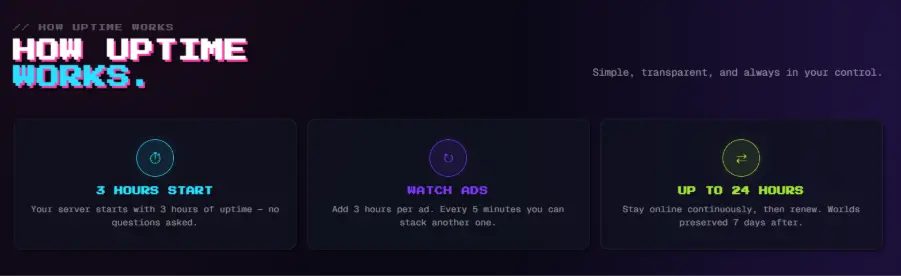
Gaming4Free positions itself as a completely free Terraria server hosting platform with 24/7 uptime at no cost. The service provides a user-friendly control panel that lets players add mods and configure server settings without technical expertise.
Gaming4Free emphasizes its community-driven approach and is committed to ensuring seamless gaming sessions for both seasoned Terraria veterans and newcomers exploring the pixel world.
Key Features:
- Intel Core i9-9900K processors with 128GB DDR4 RAM
- NVMe SSD storage for fast loading
- Easy-to-use control panel for mod management
- Free hosting with no hidden charges
- Community-driven support
How to create a Free Terraria Server on Gaming4Free?
| Step 1 | Step 2 | Step 3 | Step 4 |
| Create your free Gaming4Free account with an email | Choose Terraria from Games | Select world size and difficulty | Share the server IP and start exploring |
3. AxentHost
- Pricing: Absolutely Free
- Rating According to Google Play Store: 3.0
- Rating According to Apple Play Store: 3.6
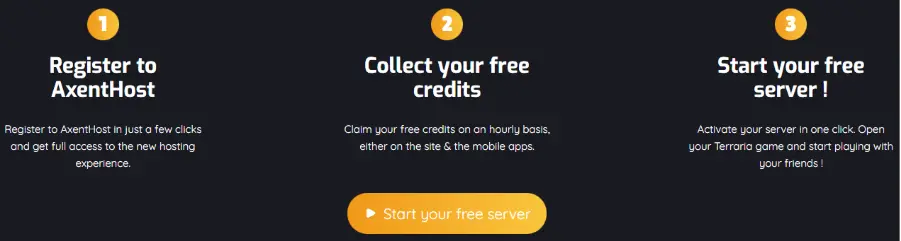
AxentHost offers free Terraria server hosting with no hidden costs or surprise fees, making it an excellent choice for budget-conscious players seeking reliability.
The platform features an intuitive and user-friendly interface that simplifies server setup and management for beginners while maintaining professional-grade capabilities for experienced users.
Key Features:
- Automated backups
- Completely free Terraria server hosting
- Scalable hardware up to 16GB RAM and 20GB storage disk size
- Mod support (Tshock, TModLoader, Calamity mod)
- DDoS protection for IP security
- 24/7 customer support
- Custom modded experience and plugin support
- Server locations in Europe and North America
How to create a free Terraria Server on AxentHost?
- Steps to create a free Terraria server on AxentHost
- Visit the AxentHost website.
- Click on Free Subscription.
- Enter your account details.
- Complete the setup and launch the server.
4. Squadnox
- Pricing: Absolutely Free
 Squadnox Terraria hosting offers a mobile-first management system available on Android, iOS, Windows, macOS, and Linux. The service operates on an ad-supported model, requiring no payment from users while delivering powerful performance.
Squadnox handles all hardware management and automatic server installation, allowing players to focus purely on gameplay rather than technical configuration.
Key Features:
- Free hosting funded through non-intrusive ads
- Up to 8 CPU cores and 16GB RAM
- NVMe SSD storage for peak performance
- No artificial player slot limits
- tModLoader support for modded gameplay
How to create a free Terraria Server on Squadnox?
| Step 1 | Step 2 | Step 3 |
| Download the app on the Play Store or App Store | Select Terraria and then click on Multiplayer | Join via IP and enter your Server IP address |
5. Fps.ms
- Pricing: Free option available, paid version starts at €1.99/month
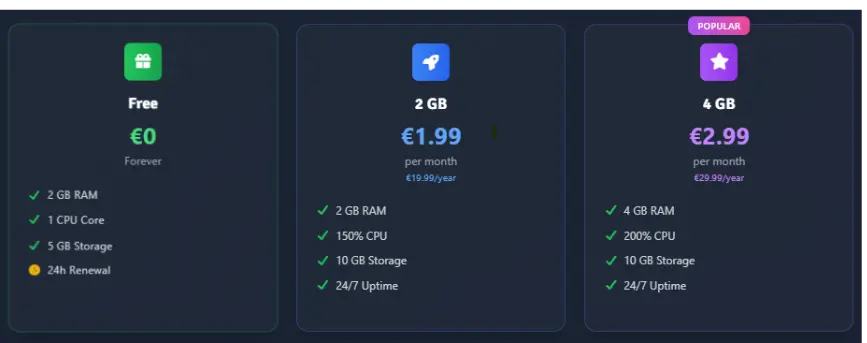
Fps.ms offers a genuinely free Terraria server hosting experience with absolutely no credit card requirement, hidden charges, upsells, or trial period limitations. The free tier provides 2GB RAM, 1 CPU core, and 5GB storage, with no player limitation you can invite as many players as you want.
Fps.ms offers global server locations in the US (Salt Lake City) and Netherlands (The Hague) to minimize latency for players worldwide.
Key Features:
- Unlimited player slots
- Mod support available (Vanilla, TShock)
- 24-hour renewal for uptime, 28-day for data retention
- File Manager and SFTP access
- Locations in the US (Salt Lake City) and the Netherlands (The Hague)
How to create a free Terraria Server on Fps.ms?
| Step 1 | Step 2 | Step 3 |
| Create your account at panel.fps.ms – takes 30 seconds | Choose the Terraria version, world size, and customize your server | Start digging, building, and exploring |
Paid Terraria Hosting Comparison (2026) :
1. BisectHosting
- Pricing: starts at $5.99/month
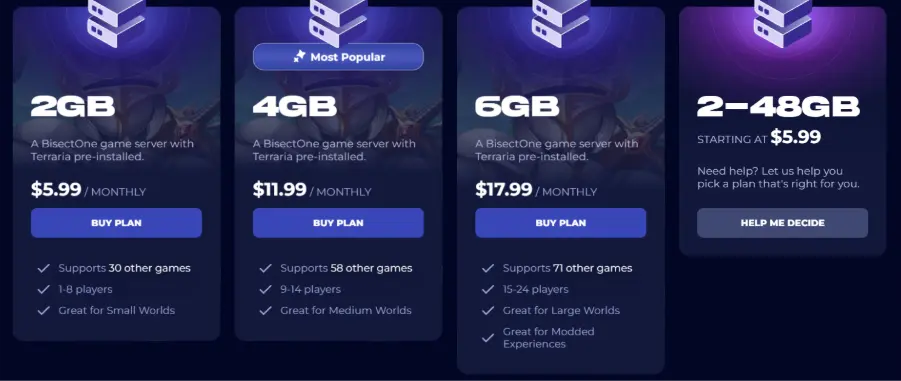
BisectHosting specializes in performance-driven Terraria dedicated server hosting with comprehensive support for both vanilla and modded gameplay. The platform supports tMod 1.3.4 & 1.4.4, a complete TShock plugin ecosystem, and features a custom-built control panel.
BisectHosting offers exceptional value through its competitive RAM-based pricing and the ability to swap between 100+ different games at no additional cost.
Key Features:
- 100+ game swapping at no extra cost
- Free DDoS protection
- 24/7/365 dedicated support
- Multiple US and European server locations
- Custom control panel for easy management
- Popular modpack support (Calamity, Starlight River)
2. Nodecraft
- Pricing: Starts at $5.96/month
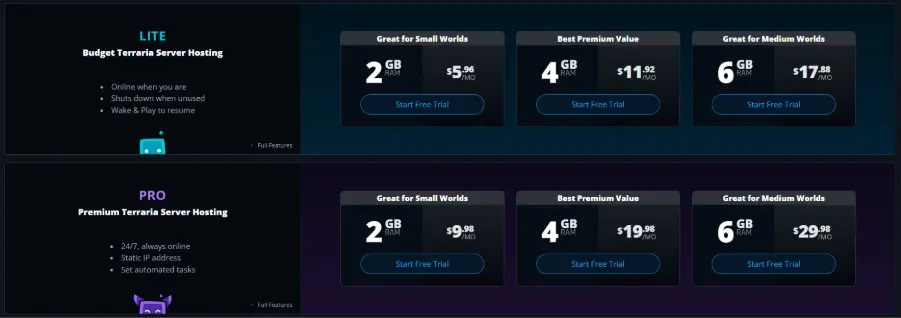
Nodecraft offers flexible Terraria hosting across two distinct product tiers (Lite & Pro) to accommodate different playstyles and budgets.
The Nodecraft Lite (Budget) tier starts at $5.96/month and features Wake & Play functionality that activates servers when you log in, perfect for casual groups. The Nodecraft Pro (Premium) tier starts at $9.98/month with automated task scheduling for power users and communities.
Both tiers leverage enterprise-grade hardware powered by Intel Xeon E-2174G processors at 3.8+ GHz, 64GB ECC RAM, and high-speed enterprise SSDs. Nodecraft uniquely supports Save & Swap functionality, allowing instant switching between games without additional charges.
Key Features:
- Lite: Wake & Play (online when needed)
- Pro: 24/7 uptime with static IP
- tModLoader and TShock support (one-click)
- 30+ global server locations
- Save & Swap: instant game switching
- 24-hour and 7-day free trials available
3. Hostinger
- Pricing: Starts at $6.99/month
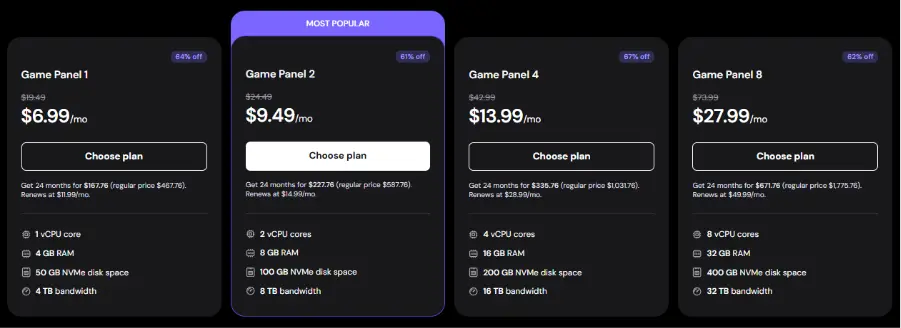
Hostinger provides enterprise-grade Terraria hosting through its scalable VPS Game Panel plans built on cutting-edge AMD EPYC processors and NVMe SSD storage infrastructure.
The plans offered by Hostinger include generous bandwidth allocations, free weekly automated backups, complete root server control, and access to the user-friendly hPanel dashboard with integrated Kodee AI Assistant.
Key Features:
- Four-tiered plans: $6.99 to $27.99/month
- Plans scale from 1 vCPU/4GB to 8 vCPU/32GB RAM
- Free weekly automated backups
- Complete root server control
- Mod support available
- Suitable for 50+ players on entry plans
4. Pine Hosting
Pricing: Starts at $3.00/month
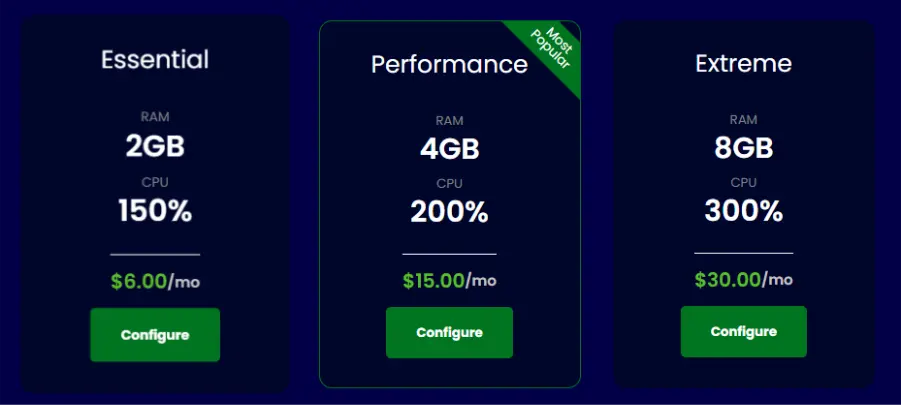
Pine Hosting is a game server provider with 99.99% uptime and a strong focus on ease of use. Their custom control panel requires no technical experience and supports full file access, mod installs, task scheduling, and backup management.
Key Features:
- Instant deployment with 99.99% uptime SLA
- DDoS protection is included on all plans
- Full file access + SFTP
- tModLoader support with easy config manager
- Backup manager, task scheduling, user control panel
- 24/7 support from experienced server owners
5. Sparked Host
Pricing: Starts at $2.50/month
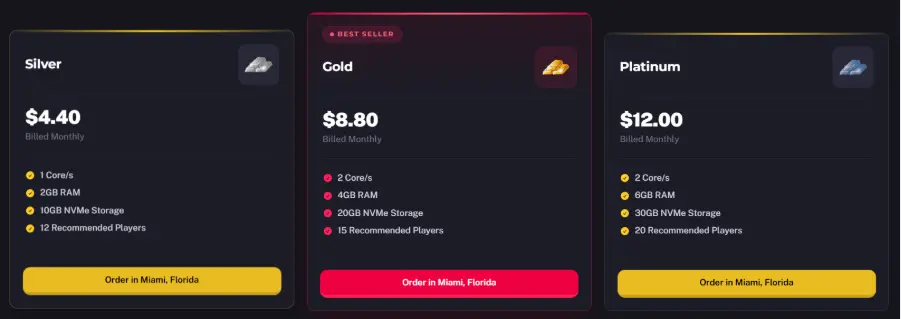
Sparked Host is the most affordable entry-level paid option at $2.50/month, offering 2GB RAM and 10GB SSD on their Budget tier. They have deployed 100,000+ servers since 2017. Their proprietary Apollo Panel is a modern control panel with a one-click mod/plugin installer, file manager, reverse proxy, and server importer tool.
Key Features:
- Enterprise tier: Ryzen 9 7900 | DDR5 RAM | NVMe SSDs for modded/community servers
- Terabit-scale DDoS protection
- 99.9%+ uptime
- 24/7/365 support
- 24-hour free trial available
How to Host a Dedicated Terraria Server? (Quick Guide)
Hosting a dedicated Terraria server allows your world to remain online even when the host is offline. Here is the step-by-step guide to set dedicated Terraria server easily:
What Do You Need?
- A machine that stays on while people play (PC, spare laptop, or VPS)
- Stable internet, 5 Mbps upload handles a small vanilla group fine
- Ability to forward a port on your router (port 7777 by default)
- Windows, Linux, or macOS, the server runs on all three
- 1 to 2GB RAM for vanilla; 2 to 4GB+ for modded worlds
Step 1. Download Server Files
Via Steam: Open your library, filter by ‘Tools’, and install ‘Terraria Server’. Files land in steamapps/common/Terraria Server/.
Via SteamCMD (headless/Linux):
Run:
steamcmd +login anonymous +app_update 105610 validate +quit
Step 2. Configure Server Settings
Edit serverconfig.txt to set world name, autocreate size (1=small, 2=medium, 3=large), maxplayers, port (7777), password, and difficulty (0=Classic, 1=Expert, 2=Master, 3=Journey).
Step 3. Start the Server
Windows: Run
TerrariaServer.exe -config serverconfig.txt
Linux: Run
./TerrariaServer.bin.x86_64 -config serverconfig.txt
World generation takes 1 to 2 minutes on its first launch.
Step 4. Port Forwarding
Forward TCP port 7777 from your router to your machine’s local IP. Check your router’s admin panel (usually 192.168.1.1).
Note: Some ISPs use CGNAT, which blocks port forwarding entirely – this is the #1 reason self-hosting fails. If your router’s WAN IP doesn’t match whatismyip.com, you’re behind CGNAT.
Step 5. Connect & Share
In-game:
- Multiplayer Join via IP.
- Remote players use your public IP.
- LAN players use your local IP.
- The default port is 7777.
Running with tModLoader
Install tModLoader via Steam (free), use its server binary, and manage mods through Mods/enabled.json in the save directory. Every player needs the exact same mod versions installed locally.
Keep It Running (Don’t Skip This)
Self-hosted servers have no auto-restart, no automatic backups, and no panel. On Linux, run inside a screen or tmux session so it survives terminal closure. On Windows, the server stops when you close the console window. Back up your world file daily at any cost.
How to Host a Free Terraria Server on Your PC?
You can run a free dedicated Terraria server directly from the official game files, which works on Windows and, with appropriate binaries, other operating systems. Hardware needs are modest for small groups, but stable upload bandwidth and keeping your machine online are critical for a smooth experience.
Steps for the Windows system are:
1. Locate or download the dedicated server
- On Steam installations, TerrariaServer.exe is usually included in the Terraria game directory; standalone dedicated server packages are linked from official resources and the wiki.
2. Configure server settings
- Use the interactive console or edit the serverconfig.txt file to set parameters such as world name, seed, difficulty, maximum players, password, port (default 7777), and MOTD.
3. Start the server
- Run TerrariaServer.exe or the appropriate script, select or generate a world, and confirm that the console shows the server is listening to your configured port.
4. Set up network access
- For internet play, configure router port‑forwarding for port 7777 (or your custom port) to your machine’s local IP, ensuring any firewall rules allow inbound traffic for the server.
5. Connect and share IP
- In‑game, choose Multiplayer → Join via IP, then enter your public IP (for remote players) or local IP (for LAN players) and server port.
For small worlds with a few players, around 512 MB to 1-2 GB of RAM for the server process is generally recommended, with higher RAM for large or heavily modded worlds.
How to Set Up a Paid Terraria Server?
Game hosting providers streamline Terraria server setup with web‑based control panels, one‑click installations, and automated configuration. While specifics differ, the overall workflow is similar across most reputable hosts.
Steps for Paid Terraria Server Setup are:
1. Choose a provider and plan
- Select a host and plan that match your expected player count, mod usage, and world size (e.g., entry RAM‑based plan or 10‑slot starter).
2. Select location and game
- Pick the nearest data center to your players to minimize latency, then choose Terraria (and optionally tModLoader or TShock) in the game list.
3. Configure settings in the panel
- Set world size, difficulty, maximum players, password, and basic server info via the control panel or a web editor for the configuration file.
4. Install mods and plugins (optional)
- Use the host’s mod manager or upload mods via file manager/FTP/SFTP for tModLoader or TShock setups.
5. Start and manage the server
- Start or restart from the panel, monitor console logs, manage backups, and apply updates through the host’s dashboard.
Paid hosts usually handle OS‑level maintenance, DDoS mitigation, and hardware monitoring, reducing the operational burden compared with running your own VPS or home server.
Why Most Players Prefer Paid Hosting?
Many players opt for paid hosting because it generally provides:
- Reliability and uptime: Paid hosts usually guarantee stable servers, less lag, and fewer interruptions.
- Better performance & scalability: With more RAM, CPU, and SSD storage, paid servers can better handle many players, large worlds, or modded setups.
- Mod support & easy management: Good paid hosts often support mod loaders (e.g., tModLoader), plugin support, backups, DDoS protection, and easy control panels.
- Support and stability: Paid services often offer 24/7 support, clear terms, and reliable infrastructure.
Because of those advantages, paid hosting tends to be the go-to for communities, modded servers, or anyone who wants a “set-and-forget” server.
Free vs Paid Terraria Hosting
| Aspect | Free self‑host / free tiers | Paid Terraria hosting |
| Monthly cost | No direct fee; electricity and bandwidth costs. | Recurring fee from low single‑digits USD/month. |
| Uptime | Limited by when your PC is on or renewal timers. | Designed for 24/7 uptime with SLAs or guarantees. |
| Performance | Depends on the home hardware and connection. | Optimized CPUs, SSD/NVMe, and data‑center bandwidth. |
| Player capacity | Fine for small groups; large worlds may lag. | Plans sized for bigger worlds and higher player counts. |
| Mod support | Possible, but manual setup and maintenance. | tModLoader/TShock is often built‑in or one‑click. |
| Management | Command‑line and manual config files. | Web control panels, file managers, backup tools. |
| Reliability & support | DIY troubleshooting, community help only. | Ticket/chat support, knowledge bases, and monitoring. |
For casual play or experimenting, free hosting or self‑hosting is usually adequate, while public or long‑term community servers benefit strongly from paid hosting.
Conclusion
Yes, you can run a free Terraria server, either by self-hosting on your PC (using the official server software) or by using a free hosting provider. That works well for small friend groups, casual play, mod testing, or just occasional multiplayer sessions.
But if you want reliability, modded servers, many players, and minimal hassle, a paid host is usually worth the cost. Paid providers invest in infrastructure, support, and stability, which means less downtime, less lag, and fewer headaches. Choosing the right Terraria server hosting provider depends on your player count, mod requirements, and uptime expectations.
In short:
- Free hosting = good for casual or small-scale Terraria sessions
- Paid hosting = the more stable, scalable, and future-proof choice.
Frequently Asked Questions
Q1. Can Terraria be hosted for free?
Ans. Yes. Either by self-hosting on your own PC (official server software) or using free hosting providers.
Q2. Which free hosting is best?
Ans. As of now, free hosting providers like Godlike host, Gaming4Free, AxentHost, or Squadnox are among the more viable, but “best” depends on how many players, mods, and uptime you need.
Q3. Is modded hosting free?
Ans. Free hosts sometimes support modded servers, but modded servers stress resources more, so performance or stability may suffer. Paid hosts are generally better for modded setups.
Q4. How many players can join?
Ans. With self-hosting or typical hosting, the default player limit is 16 (in older versions, 8), but many paid hosts allow more players depending on the plan.
Q5. Is hosting Terraria on mobile free?
Ans. Yes, there are free options available. Terraria mobile includes a native “Host & Play” feature that’s free, letting you host a server locally while playing. Friends can join via your IP address, though the server closes when you exit the game.
Q6. How much RAM does a Terraria server need?
Ans. A small Terraria server typically needs 1–2 GB RAM for 4–8 players. Modded servers or larger worlds may require 4GB or more.
Q7. What is the best Terraria server hosting for mods?
Ans. For modded servers using tModLoader, paid hosting providers with higher RAM and CPU performance usually offer better stability and performance.
Source Link:
- https://godlike.host/terraria-server-hosting/
- https://sparkedhost.com/game-server-hosting/terraria#plans
- https://pinehosting.com/terraria
- https://www.hostinger.com/vps/terraria-hosting
- https://www.bisecthosting.com/terraria-server-hosting
- https://nodecraft.com/games/terraria-server-hosting?currency=usd&term=1&interval=month&game=terraria
- https://fps.ms/free-terraria-server-hosting/
- https://squadnox.com/games/terraria
- https://axenthost.com/games/terraria/
- https://gaming4free.net/free-terraria-hosting
- https://winternode.com/blog/terraria/terraria-dedicated-server-setup
- https://terraria.wiki.gg/wiki/Guide:Setting_up_a_Terraria_server

manvinder Singh
https://www.hostingseekers.com
Manvinder Singh is the Founder and CEO of HostingSeekers, an award-winning go-to-directory for all things hosting. Our team conducts extensive research to filter the top solution providers, enabling visitors to effortlessly pick the one that perfectly suits their needs. We are one of the fastest growing web directories, with 500+ global companies currently listed on our platform.