
Best Palworld Server Hosting in 2026: Setup, Mods & Performance
Game Updated on : September 16, 2026Running your own Palworld server gives you full control over gameplay, mods, performance, and who can join your world. Whether you are hosting a small private co-op server or planning a public multiplayer community, choosing the right Palworld Server Hosting in 2026 directly affects lag, uptime, and player experience.
Palworld Server Hosting: Quick Overview
Palworld Server Hosting lets players run a dedicated multiplayer server that stays online 24/7, without relying on a single player’s device. In 2026, popular Palworld server hosting providers include Godlike Host, Hostinger, Shockbyte, DatHost, Pine Hosting, and Host Havoc, offering different levels of performance, control, and pricing.
Managed hosting is ideal for beginners due to its easy setup and built-in protection, while VPS hosting offers greater customization for advanced users. A dedicated Palworld server is recommended for larger groups, modded gameplay, or long-term worlds, as free or local servers are limited by performance and uptime.
Below, we will break down what Palworld is and how servers work, the best hosting providers in 2026, and how to set one up step by step.
What is Palworld?
Palworld is an open-world survival and crafting game developed by Pocketpair, combining creature collection (“Pals”) with base building, automation, combat, and multiplayer co-op.
Think of Palworld like a mix of:
- Pokémon-style creature collection
- ARK-style survival servers
- Factory automation
A Palworld dedicated server allows multiple players to join the same persistent world 24/7 without relying on one player’s PC being online.
Top 6 Palworld Server Hosting in 2026
Below are the most reliable and widely used Palworld Game Server Hosting providers based on performance features, ease of setup, and official support.
1. Godlike Host
- Pricing: Starts at $15.99/month
- Best For: Players want customizable Palworld servers with mod support and access to multiple locations. It’s best for both small groups and larger modded communities
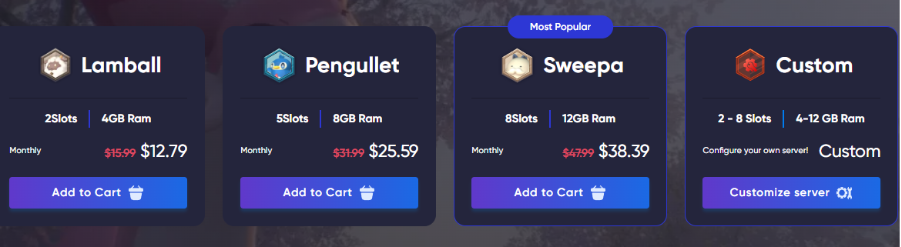
Godlike Host provides dedicated and customizable Palworld server hosting designed for smooth 24/7 performance. They offer a custom Pterodactyl control panel, mod and plugin support, SFTP access, and DDoS protection. Servers can be set up within minutes of purchase, and players of any region can join thanks to a low-latency global network and robust infrastructure.
Key Features:
- Instant setup and global access are available; your server starts in minutes
- Safeguard your world with built-in DDoS protection andan automated backup system
- Pterodactyl control panel helps you manage settings, server files, and mods through a user-friendly interface.
- Customization is available with multiple slots, and RAM configuration helps you scale from small private worlds to larger communities.
- Share a link for file configuration with a unique text editor without giving file access.
- Manage your Palworld server directly via the Discord bot and create linked servers.
Godlike Host handles the infrastructure while you manage your Palworld server through an easy control panel.
2. Hostinger
- Pricing: starts at $17.99/month
- Best For: Semi‑technical users who want VPS‑grade performance with a game panel and easy scaling.
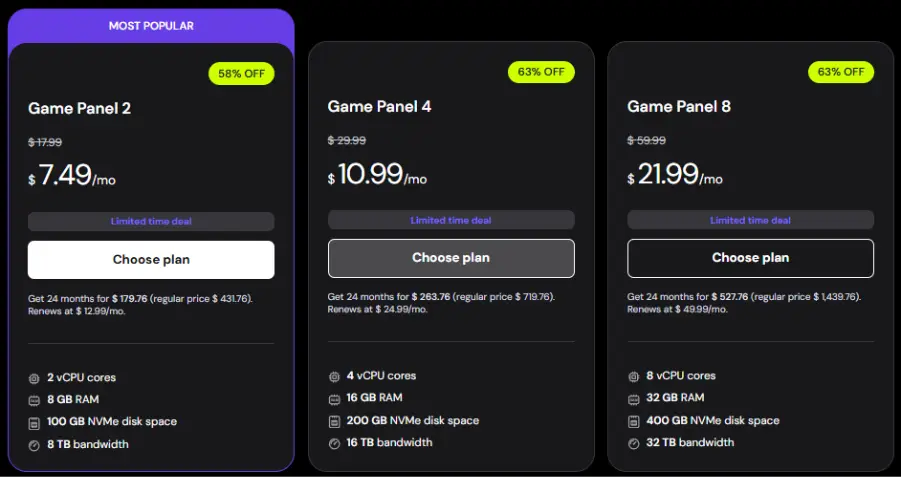
Hostinger provides Palworld hosting on VPS infrastructure with AMD EPYC CPUs, NVMe SSD storage, and DDoS protection, exposed through a dedicated Game Panel. Hence, you avoid raw Linux commands for most tasks. Under the hood, you still get root access, so it behaves like a typical VPS, allowing you to later move from “panel only” to manual SteamCMD installs as you become more technical.
Key Features
- Game Panel with one‑click Palworld instance creation, log access, and configuration menus, similar to a lightweight cPanel but for game servers.
- Weekly backups on VPS plans are helpful for testing new mods or config changes so that you can roll back quickly.
- Global data centers (North America, Europe, Asia, South America), letting you place the server close to your friend group to reduce latency.
- Self‑managed VPS model with full root access, allowing you to install custom tools (e.g., monitoring agents or additional game services) alongside Palworld.
A VPS is like renting your own small cloud computer. Palworld runs continuously in the background, even when you are offline.
3. Shockbyte
- Pricing: starts at $11.99/month
- Best For: Players comfortable with game control panels who want strong mod support and lots of Palworld‑specific guides.

Shockbyte is a long‑running game server host (since 2013) focused on titles like Palworld and Minecraft, using its own Shockbyte Control Panel 2.0 for server management. It targets gamers rather than sysadmins, so most actions are done through web UI toggles and config sections instead of shell commands or raw config files.
Key Features
- Palworld‑focused control panel with config tabs where you can adjust game settings (difficulty, rates, multipliers) without editing files manually.
- 24/7 support plus Palworld knowledge‑base articles, including a dedicated guide on setting up and configuring Palworld servers.
- Instant setup with automatic email delivery of server credentials so you can go from purchase to playing within minutes.
- Global server locations and a money‑back guarantee window make it safer to test performance for your region.
Shockbyte handles the backend. You control your server via a dashboard rather than command lines.
4. DatHost
- Pricing: starts at $15.02/month
- Best For: Tech‑curious users who want flexible scaling and are okay with slightly more advanced configuration workflows.
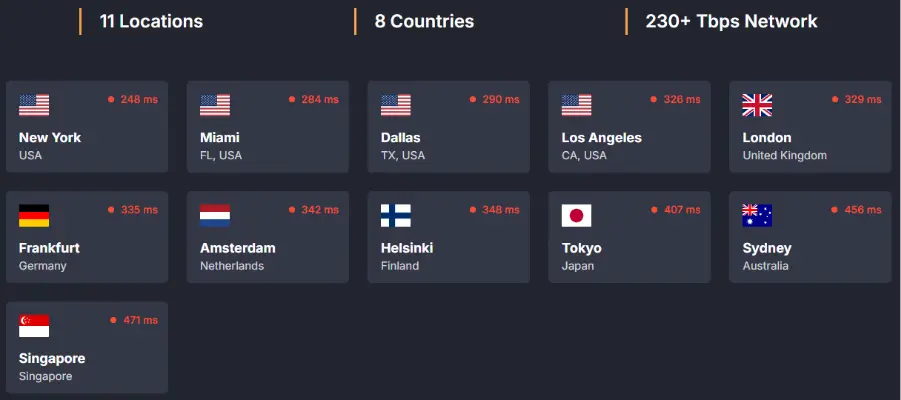
DatHost offers customizable Palworld server hosting with an emphasis on performance hardware and DDoS protection, aimed at communities that expect to grow or frequently tweak server size. Its platform is closer to a “configure and tune as you go” style, which suits users who are comfortable with more detailed settings and scaling decisions.
Key Features
- Easy resource scaling, allowing you to increase slots or hardware resources as your Palworld community grows.
- High‑performance hardware and built‑in DDoS protection to keep survival and boss fights responsive, even with many active Pals and structures.
- Mod support with the caveat that deployment can require higher technical skills compared with beginner‑oriented hosts.
Your server only costs money when players are online, like turning a server “on” and “off.”
5. Pine Hosting
- Pricing: starts at $14.99/month
- Best For: Smaller friend groups or casual communities that value personal‑style support over maximum raw performance.
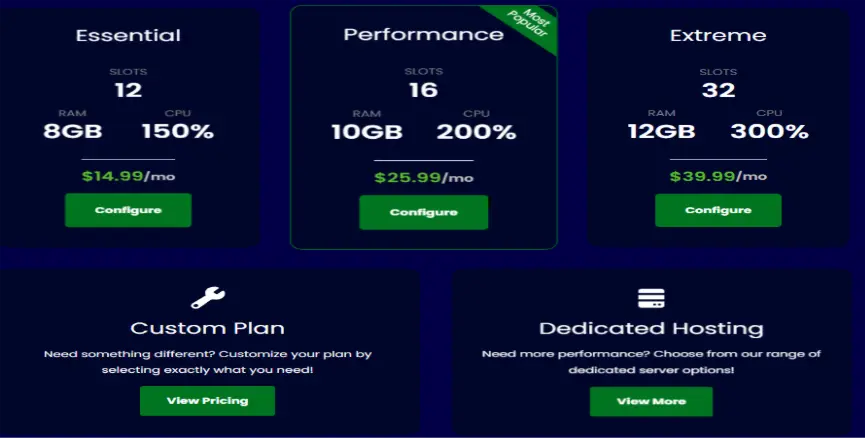
Pine Hosting positions itself as a simpler game-hosting provider focused on small‑scale Palworld servers, trading some scale and raw performance for a more personal hosting experience. This makes it suitable when you want a stable private world shared with a close circle, not a 100‑player public community.
Key Features
- A simple server management workflow appropriate for beginners, with fewer but more precise options.
- More attentive customer support is enabled by its smaller scale, which can help if you are new to running game servers.
- Reasonable costs at small player counts, though less cost‑effective if you try to host huge communities.
Good for players who want hosting without dealing with server files directly.
6. Host Havoc
- Pricing: starts at $12/month
- Best For: Gamers who like traditional game‑server‑host workflows: slot‑based plans, control panel management, and multi‑game experience.
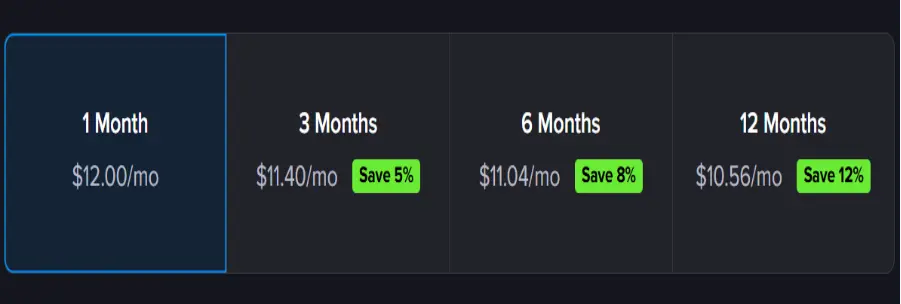
Host Havoc is a dedicated game server provider supporting Palworld alongside numerous other games, using a game server panel model similar to other legacy hosts. Its approach prioritizes familiar management patterns like slots, basic config panels, and region choice over VPS‑style flexibility.
Key Features
- Managed Palworld hosting with a web control panel for common tasks like restarts, config edits, and basic mod handling.
- Multiple global locations are designed to keep latency low for common player regions.
- Established brand in the game hosting market, which can be reassuring if you have already used it for other games.
Ideal if you expect many players online simultaneously and want stable performance.
Comparison Table for the Best Palworld Server Hosting Provider
| Provider | Hosting Type | Ease of Use | Mod Support | Best For |
| Godlike Host | Managed | Easy | Full (via SFTP/mods) | All, from small groups to larger communities, and Customizable servers |
| Hostinger | VPS | Easy | Full (.pak support) | Best overall / Reliability |
| Shockbyte | Managed | Easy | Limited | Beginners |
| DatHost | Managed | Easy | High (Requires tech) | Short-term servers |
| Pine Hosting | Managed | Easy | Moderate | Budget users |
| Host Havoc | Managed | Easy | Full (1-click) | Performance-focused |
Palworld Server Hosting Step-by-Step Setup Guide
1. Choose a plan and region
- Estimate player count: for ~4 to 10 friends, entry plans are enough for 20 to 30+ players, pick mid‑tier CPU/RAM.
- Select the region closest to your group (e.g., US for Dallas players) to minimize latency and rubber‑banding.
2. Create the Palworld server
1. With VPS‑style hosts (like Hostinger), either:
- Use the Game Panel to Create Instance → Palworld, which auto‑installs files and sets up basic config.
- Or, for manual installs, connect via SSH, install SteamCMD, download the Palworld server files, and configure the .ini file.
2. With panel‑only hosts (Shockbyte, DatHost, Pine, Host Havoc), choose Palworld during order and let their system provision the server automatically.
3. Configure basic settings
- In the provider’s config tab or panel, set: server name, password/private mode, player limit, and difficulty multipliers like XP or resource rates.
- Apply and restart the server so Palworld loads the new settings.
4. Open ports/networking (semi‑tech view)
- With game‑panel hosts, Palworld automatically opens and firewall ports for you.
- With VPS setups, ensure your firewall and security rules allow Palworld’s port so friends can connect from outside.
5. Connect from the game client
- From Palworld, add the server via IP and port or find it in the community server list if publicly listed.
- Join and test: spawn in, place a few structures, and fight some mobs to check for lag spikes under load.
6. Routine maintenance
- Schedule or trigger restarts during off‑hours to keep memory usage and performance healthy.
- Use built‑in backup tools (like Hostinger’s weekly backups) before installing new mods or changing core settings.
Popular Palworld Mods
Palworld mods frequently change balance, automation, and quality of life; hosts handle them differently.
1. Gameplay balance and difficulty mods
- Increase or decrease damage, health, or enemy behavior to make boss fights harder or base defense more intense.
- Good hosts expose core multipliers in the panel so that you can achieve some of this without full mods.
2. Automation and building enhancements
- Mods that expand what Pals can automate (farming, crafting) or improve building tools can increase CPU usage when many structures and Pals are active.
- On shared hosts, this is where higher‑tier RAM and CPU plans start to matter.
3. Quality‑of‑life and utility mods
- Examples include improved UI, better storage management, or minimap enhancements that reduce friction rather than radically changing gameplay.
- Hosts with good file access (FTP/SFTP or file manager) make deploying these mods easier.
When adding mods, always check your host’s Palworld documentation for supported mod installation methods to avoid breaking the server.
Can You Host a Free Palworld Server?
Official game server hosts do not offer truly free, production‑ready Palworld hosting; most use paid plans with occasional coupons or promo discounts. In theory, you can run a Palworld server on your own hardware at home, but you then handle power costs, port forwarding, security, and 24/7 uptime yourself.
A “free” setup usually means repurposing an existing PC or an old server and paying with your time and bandwidth rather than a subscription. For public or modded communities, professional hosting with DDoS protection and monitored hardware is far more practical and stable.
When to Use Hosting vs. Local?
Think of local hosting as a temporary lab and third‑party hosting as production.
1. Use local hosting when:
- You are just testing mods or configs for a short solo session, and downtime is fine.
- Fewer friends join occasionally, and you do not need 24/7 uptime or global access.
2. Use game hosting when:
- You need the server online even when your PC is off, like for persistent bases and farms.
- You host a large player group, where upstream bandwidth and home‑grade routers become bottlenecks.
- You want panel‑driven management, DDoS protection, backups, and support to recover quickly from crashes or bad mods.
Conclusion
There is no single “best” Palworld Server Hosting, and yes, you read correctly, because the right choice depends on your needs.
- Best customizable/mod support: Godlike Host (for those who want full control with powerful features and scalable options)
- Best overall flexibility: Hostinger (VPS control)
- Best beginner option: Shockbyte
- Best pay-as-you-go: DatHost
- Best budget hosting: Pine Hosting
- Best performance stability: Host Havoc
For serious multiplayer gameplay in 2026, paid Palworld server hosting is worth it for stability, performance, and control.
Frequently Asked Questions
Q1. What are the different types of Palworlds?
Ans. There are several Pal variations you can encounter beyond standard Pals:
- Regular Pals: The common version found throughout the world with typical abilities and stats.
- Alpha Pals: Larger boss-type Pals with titles that spawn in the wild and can be fought or captured.
- Lucky Pals: Rare shining variants that appear with a glowing effect and come with the special “Lucky” passive trait and unique skills.
- Legendary Pals: Exceptionally rare Pals that appear only as Alpha Pals and possess the “Legend” trait, boosting stats.
- Subspecies / Fusion Pals: Special variations created through breeding two specific species, sometimes with distinct appearances or traits.
Each type offers different gameplay experiences, from powerful bosses to rare and valuable companions.
Q2. What are the benefits of Palworld’s server?
Ans. A Palworld server enables players to enjoy smoother, more stable multiplayer gameplay with reduced lag compared to regular co-op hosting. It keeps the game world online 24/7, so friends can join and play anytime, even when the host isn’t present. Dedicated servers also offer better control over game settings, player access, and backups, making them ideal for long-term progression, group play, and building a shared Palworld community.
Q3. What are the best Palworld hosting providers?
Ans. The best Palworld hosting providers in 2026 include Godlike Host, Hostinger, Shockbyte, DatHost, Pine Hosting, and Host Havoc. Godlike Host is ideal for players who want fully customizable servers with strong mod support and powerful admin tools. Hostinger is ideal for users who want VPS-based flexibility and complete control, while Shockbyte, Pine Hosting, and Host Havoc offer managed Palworld servers with instant setup and beginner-friendly control panels. DatHost stands out with its pay-only-when-running pricing model, making it suitable for short-term or flexible use. Each provider caters to different needs based on performance, ease of use, customization, and server management preferences.
Q4. Is Palworld server hosting free?
Ans. You can host a Palworld server for free by running the official Steam Dedicated Server on your own PC or another computer, which requires owning the game to play as a client, or by using SteamCMD. SteamCMD is a more technical setup, but it allows you to run the server without needing a game copy on the server machine.

manvinder Singh
https://www.hostingseekers.com
Manvinder Singh is the Founder and CEO of HostingSeekers, an award-winning go-to-directory for all things hosting. Our team conducts extensive research to filter the top solution providers, enabling visitors to effortlessly pick the one that perfectly suits their needs. We are one of the fastest growing web directories, with 500+ global companies currently listed on our platform.