Weebly vs GoDaddy: Which Website Builder is Better in 2026?
Comparison Updated on : April 29, 2026Both platforms offer a no-code, drag-and-drop experience with built-in hosting, SEO tools, and ecommerce capabilities. However, they are designed for different types of users.
This in-depth Weebly vs GoDaddy comparison covers everything you need to make the right call, we tested both platforms hands-on by comparing pricing, ease of use, templates, eCommerce, and SEO tools. So, you can choose the right website builder for your business need in 2026.
Key Takeaways
- Weebly is better suited for beginners and small ecommerce businesses looking for a polished drag-and-drop editor with a generous free plan.
- GoDaddy wins on speed, AI-powered tools, and overall value for money for businesses that want to get online fast.
- Weebly’s paid plans start at just $13/month, making it one of the more affordable options with ecommerce included.
- GoDaddy’s paid plans start with $14.95/month with a free custom domain, Airo AI builder, and more features.
- GoDaddy’s Airo AI builder and integrated marketing tools give it an edge for growth-focused small businesses.
- Both platforms offer free plans, but GoDaddy’s free trial unlocks all premium features for 7 days only.
- For SEO flexibility and app integrations, Weebly leads with its App Center; GoDaddy offers no third-party app store.
- Weebly is owned by Square, giving it a seamless edge in payment processing and POS integration.
Weebly vs GoDaddy: Quick Comparison Table
| Feature | Weebly | GoDaddy |
| Free Plan | Yes, for a month | Yes, for 7 days |
| Starting Price | $13/month | 14.95/month |
| Drag-and-Drop Editor | Yes | Yes |
| AI Website Builder | No | Airo AI Builder |
| Number of Templates | 65 | 228 |
| Ecommerce | Yes | Yes |
| SEO Tools | Built-in (all plans) | Basic is free, and the premium advanced option is available |
| Email Marketing | Yes | Yes |
| 24/7 Customer Support | Chat & Email | Phone, Chat |
| custom Domain | Yes, with paid plans | Yes, with paid plans |
What is Weebly?
Weebly is a website builder founded in 2006 and acquired by Square (now Block, Inc.) in 2018. It has a total of approx. 1,769,259 websites, 525,632 live websites, and 1,243,627 sites that used Weebly historically. It is best known for its intuitive drag-and-drop interface, polished design themes, and tight integration with Square’s payment processing and point-of-sale (POS) ecosystem.
Weebly is particularly popular with small business owners, bloggers, and creatives who want a professional-looking website without needing technical skills. Its strength lies in its balance between simplicity and design quality; themes are mobile-responsive out of the box and require minimal customization to look great.
Since the Square acquisition, Weebly has leaned more heavily into ecommerce, making it a viable option for small online stores. It also includes a built-in blogging platform, email marketing tools, and an App Center with third-party integrations.
Best for: Beginners, small ecommerce stores, creatives, Square POS users.

If you need help while using the platform, check out our detailed guides on how to contact Weebly customer support.
What is GoDaddy?
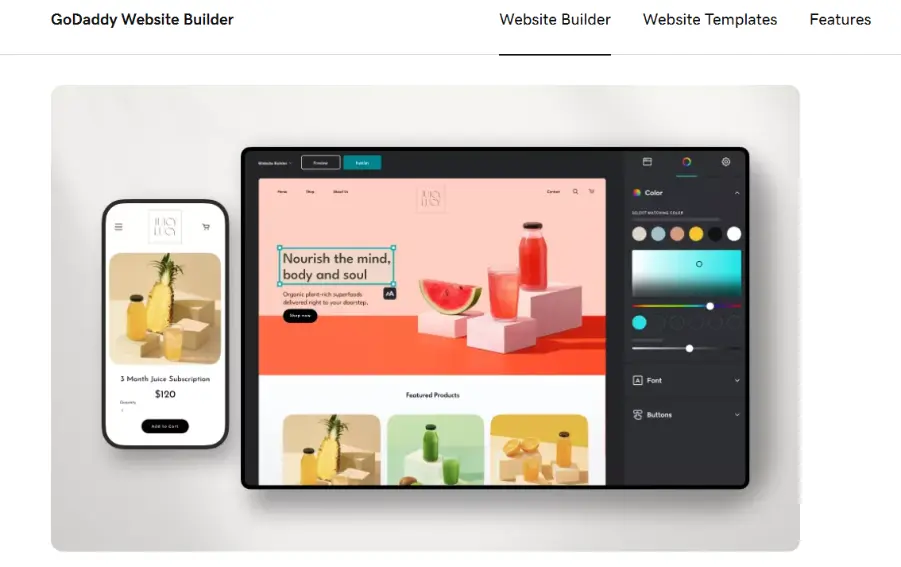
GoDaddy is one of the world’s largest domain registrars and web services companies, founded in 1997, and according to W3techs, GoDaddy is used as a web hosting provider by 1.8% of all websites. But its Website Builder has grown into one of the most feature-rich hosted website platforms available, with approximately 10,076,551 websites. GoDaddy’s standout feature in 2026 is Airo, its AI-powered website builder that creates a complete, personalized website from just a few text prompts in minutes.
GoDaddy’s website builder is designed for speed and simplicity. It uses an AI-driven design approach to get users online as fast as possible and bundles in a surprisingly robust set of marketing tools, including email campaigns, social media posting, appointment booking, and an integrated SEO Wizard.
GoDaddy Website Builder is part of a broader ecosystem that includes domain registration, professional email, hosting, marketing tools, and 24/7 support. This makes it particularly powerful for business owners who want to manage everything in one place.
Best for: Small businesses, service providers, users who want to get online quickly, and businesses leveraging AI tools.
Support quality matters while choosing a website builder. Explore different ways to reach GoDaddy support before making your decision.
Key difference: Weebly gives you more manual design flexibility through drag-and-drop. GoDaddy’s AI builder does more of the work for you; it’s ideal if you want a fast, professional result without spending hours designing.
Weebly vs GoDaddy: Pricing Comparison
GoDaddy
| GoDaddy | Pricing |
| Free | 7-days free trial |
| Basic | $14.95/month (when billed annually)
$31.95/month (when billed month to month) |
| Premium | $22.69/month (when billed annually)
$59.95/month (when billed month to month) |
| Commerce | $24.50/month (when billed annually)
$68.95/month when billed month to month) |
GoDaddy’s free plan allows you to create a website, but does not support a custom domain or ecommerce. The Basic plan at $14.95/month is the entry-level paid option, though it lacks SEO tools and marketing features. The Premium plan is where GoDaddy’s real value shows, it includes the SEO Wizard, social media posting, and email marketing. GoDaddy’s Commerce plan supports full ecommerce functionality, including payment processing, up to 5,000 products, inventory management, and abandoned cart recovery.
Note: GoDaddy’s month-to-month pricing is significantly higher. Annual billing is recommended for cost savings.
Weebly
| Weebly | Pricing |
| Free |
|
| Personal |
|
| Professional |
|
| Performance |
|
Weebly’s pricing is considerably more affordable at every tier. The Personal plan at $13/month gives access to a custom domain. The Professional plan includes unlimited storage, password-protected pages, and expanded ecommerce. The Performance plan is Weebly’s premium offering with advanced ecommerce features, real-time shipping rates, and priority support.
Crucially, Weebly includes basic ecommerce on its free plan, which is a meaningful advantage for users testing the waters before committing.
Pricing Verdict
Weebly wins on price. Its plans are substantially cheaper across every tier, and its free plan includes ecommerce functionality that GoDaddy reserves for paid plans. If budget is your primary constraint, Weebly is the clear winner. However, if you factor in the value of GoDaddy’s AI tools, marketing features, and faster page speed, GoDaddy can justify its higher price point for growth-oriented businesses.
Templates and Website Designs Flexibility
| Design Factor | Weebly | GoDaddy |
| Number of templates | Over 50 | Over 200 |
| Template customization | High (full drag-and-drop) | Medium (section-based) |
| Mobile responsiveness | Automatic | Automatic |
| Custom CSS/HTML | Available | Limited |
| AI template selection | Manual | Airo auto-selects |
| Switch templates | Requires rebuild | Easier to swap |
Weebly Templates
Weebly offers a curated selection of 65 professionally designed themes created by top designers. Every theme is mobile-responsive, ready to launch immediately, and fully customizable. Weebly’s themes are organised into categories like Online Store, Business, Portfolio, and Personal, though the category filters can be vague and limited in scope.
What Weebly does exceptionally well is design quality over quantity. Its themes look polished and professional without much customisation, making them ideal for users who want a clean, branded website quickly. Weebly also supports custom fonts, parallax and reveal animation effects, video backgrounds, and an integrated image editor, these are the features that go beyond what basic builders typically offer.
Users can also edit HTML, CSS, and JavaScript directly for more advanced customisation, giving Weebly an edge for developers or semi-technical users who want more control.
GoDaddy Templates
GoDaddy offers 228 mobile-optimised templates spanning a wide range of industries and niches. This gives it a clear quantity advantage. Templates are clean and professional, particularly within niche categories like restaurants, salons, fitness, and professional services.
However, GoDaddy’s design flexibility is more constrained compared to Weebly. While templates are customisable in terms of colours, fonts, and images, users looking for advanced layout control or deep design expression may find the editor limiting. The newer Airo AI builder partially mitigates this by generating a personalised design based on your brand inputs, though the output can sometimes feel generic.
Verdict: Weebly wins on design quality and flexibility. GoDaddy wins on template volume and AI-assisted generation speed.
Weebly vs GoDaddy: Features Comparison
| Feature | Weebly | GoDaddy |
| Drag-and-Drop Editor | Intuitive, block-based | AI-assisted, section-based |
| Custom Domain | On paid plans | On paid plans |
| Blogging | Full drag-and-drop blog | Basic blog editor |
| Email Marketing | Via Square Marketing | Built-in (500–unlimited sends) |
| Social Media Tools | Integrated | Up to unlimited posts (Premium+) |
| Appointment Booking | App Centre | Built-in (Standard+) |
| Analytics | Integrated + Google Analytics | GoDaddy InSight + Google Analytics |
| App Integrations | App Center (100+ apps) | No app marketplace |
| SSL Certificate | Free | Free |
| Unlimited Storage | Paid plans | Paid plans |
| AI Content Generation | No | GoDaddy Airo |
| Video Backgrounds | Yes | Limited |
| Password-Protected Pages | With the premium paid option | Not available |
Key Finding: GoDaddy’s lack of a third-party app marketplace is a significant long-term limitation. Weebly’s App Center gives users access to 100+ integrations, from membership tools to advanced booking systems, meaning Weebly can grow with your business in ways GoDaddy simply cannot. For any business expecting to add functionality over time, this difference matters more than it might appear at the outset.
Weebly vs GoDaddy: Ease of Use
Weebly Ease of Use
Weebly’s editor provides a drag-and-drop interface where you can pick any element (text, image, button, form, map) from the left panel and drop it anywhere on the page. This gives you genuine creative freedom. The learning curve is gentle, but it does require you to make design decisions: where to place elements, how to size them, and what spacing looks right.
The editor organises site-building into logical sections, and the block-based system prevents you from making layout errors that would result in broken designs. Weebly’s mobile editor also lets you preview and adjust how your site looks on smartphones directly from the dashboard.
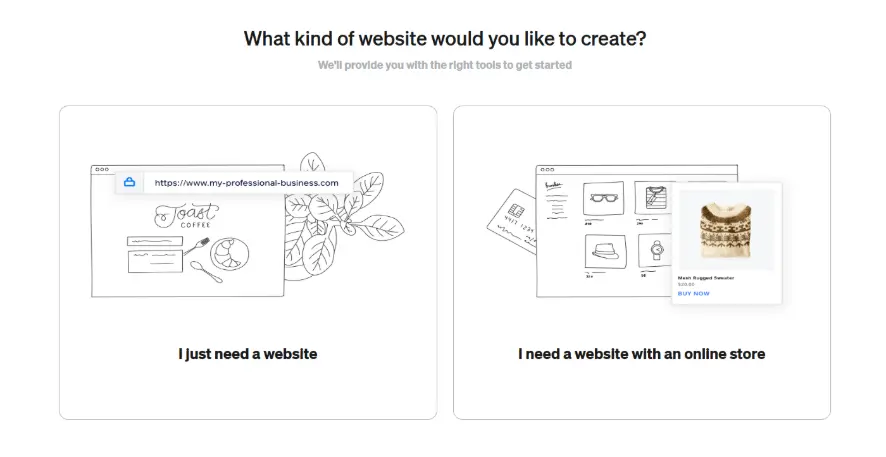
Our testers rated Weebly’s editor at 8.5/10 for ease of use – Excellent for beginners, clean interface, low learning curve.
GoDaddy Ease of Use
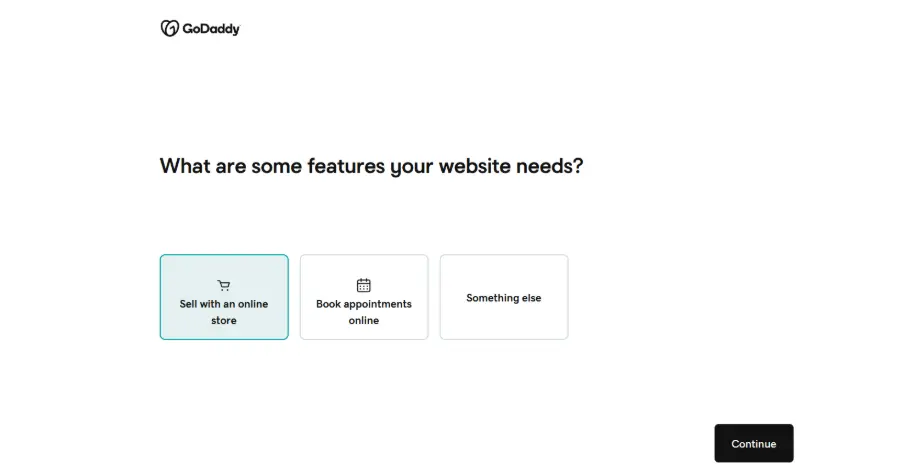
GoDaddy has improved its ease of use over the past few years with the introduction of its Airo AI builder. New users are guided through a quick setup flow where they answer a few questions about their business, and the AI generates a customised website with pre-populated content, images, and colour schemes in minutes.
The resulting editor is intuitive and section-based, making it straightforward to swap content and rearrange page sections. GoDaddy’s editor is particularly strong for mobile; all templates are responsive, and the editor works seamlessly on mobile devices, too.
Where GoDaddy loses points is in deeper customisation. Users who want to go beyond the AI-generated design may find the editor more constrained than Weebly’s, and some advanced options require watching tutorials or reading help documentation.
Our testers rated it 8.0/10 for ease of use – Excellent for quick setup, AI-assisted is impressive, but less flexible for advanced users.
Bottom line on usability: Weebly is better if you want hands-on design control. GoDaddy is better if you want to launch a professional-looking site as fast as possible without making many design decisions yourself.
Ecommerce Features Weebly vs GoDaddy
Both platforms support online selling, but there are significant differences in transaction fees, product limits, and selling features that can have a real impact on your bottom line.
| eCommerce Feature | Weebly | GoDaddy |
| Transaction Fee | 3% (free/personal plans) | 0% (Commerce plan) |
| Unlimited Products | All plans | Commerce plan |
| Digital Downloads | Available | Available |
| Abandoned Cart Recovery | No | Yes |
| Shoppable social posts | No | US & CA |
| Appointment booking | Via app | Premium+ |
| POS integration | Square POS | GoDaddy Payments |
Weebly eCommerce
Weebly’s online store is powered by Square, which is both a strength and a limitation. On the positive side, the Square integration is seamless. If you already use Square for in-person sales, Weebly gives you a unified inventory management system. You can sell physical products, digital downloads, and services.
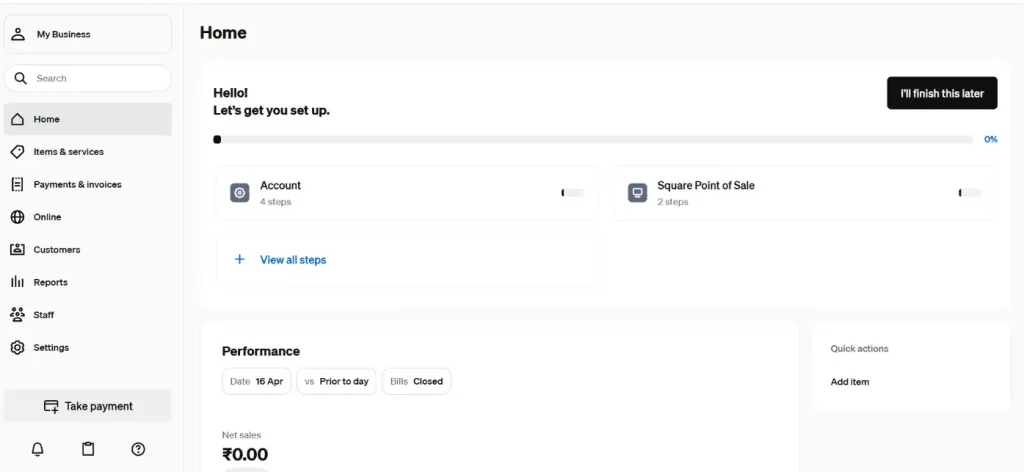
Weebly eCommerce Dashboard
You just need to follow 4 steps to set up your account and start selling products by updating product details, images, and logo. It’s simple to use, even for beginners with no technical experience. The dashboard is clean and uncluttered. As you can see above, everything is accessible from the left-hand navigation with no hidden menus or confusing workflows.
The downside: Weebly charges a 3% transaction fee on its free and Personal plans. You will need to upgrade to the Professional plan or higher to remove fees. The eCommerce feature set is functional but behind GoDaddy’s in terms of advanced tools like shoppable social posts and abandoned cart recovery.
GoDaddy eCommerce
GoDaddy’s Commerce plan offers 0% transaction fees, unlimited product listings, shoppable social posts (US & Canada), automatic sales tax calculation (US), and multiple payment and delivery options. The Premium plan adds appointment booking and online deposits, making it a strong choice for service businesses. GoDaddy Payments is a fully integrated payment processor available in the US and Canada, which streamlines the checkout experience and reduces reliance on third-party processors.
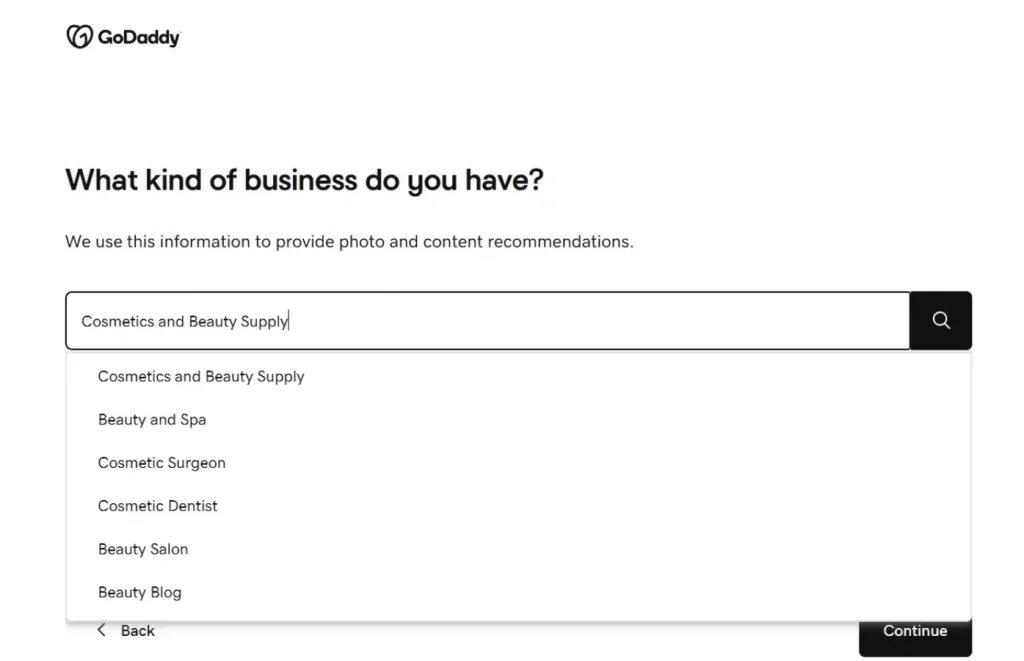
GoDaddy account creation interface
The interface for e-commerce setup is very easy; you just need to follow the steps according to your commerce criteria, like
- What kind of business do you have?
- What will your customers call your business?
- How should people who visit your site contact you?
- A bit of detail introduction about your business.
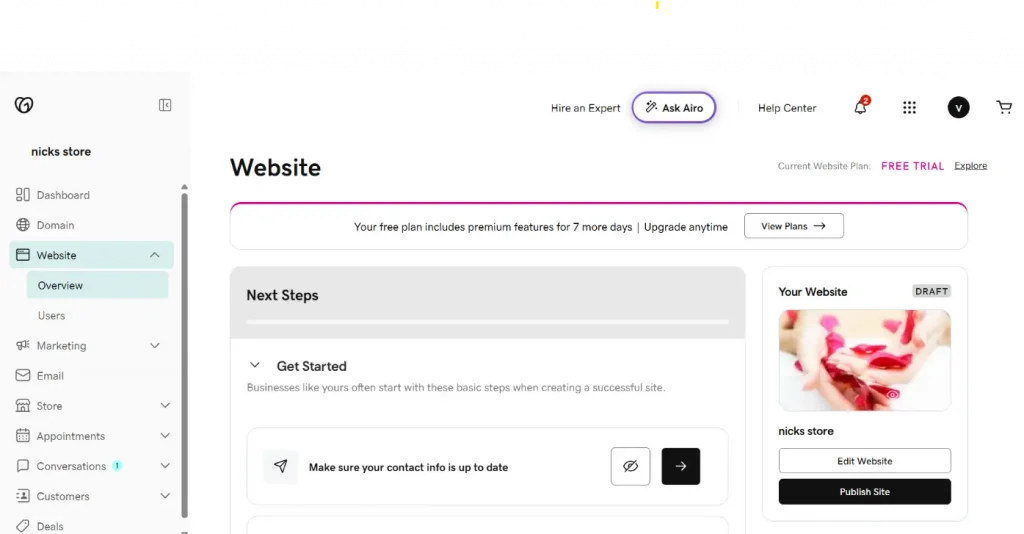
Once your initial setup is complete, the GoDaddy Website dashboard gives you a clear action plan. Just complete some basic needed information, like verifying contact details, customizing your pages, and publishing when ready. The Airo AI assistant (accessible via the “Ask Airo” button in the top bar) is on hand throughout to answer questions, generate copy, or suggest design improvements. Your draft site is visible in the right sidebar, so you can preview it and hit “Publish Site” the moment you are happy.
eCommerce verdict: GoDaddy wins for online stores, especially for US-based businesses. Weebly is better only if you’re already in the Square ecosystem and need a unified in-person + online inventory.
Weebly vs GoDaddy: SEO Comparison
SEO is a critical factor for any website that wants to attract organic traffic from search engines like Google. Here’s how both platforms compare:
| SEO Feature | Weebly | GoDaddy |
| Custom Meta Titles & Descriptions | All plans | Premium+ only |
| Custom URLs/Slugs | All plans | Premium+ only |
| Image Alt Text | Yes | Yes |
| SSL Certificate | Free on all plans | Free on all plans |
| Mobile Responsive | Yes | Yes |
| XML Sitemap | Auto-generated | Auto-generated |
| 301 Redirects | Yes | Limited |
| SEO Wizard / Guided SEO | Manual | GoDaddy SEO Wizard |
| Google Analytics Integration | Yes | Yes |
| Schema Markup | Limited | Limited |
| Blog for Content SEO | Full blog | Basic blog |
| Page Speed | 2.6 seconds | 1.8 seconds |
| AI-Powered SEO Suggestions | No | GoDaddy Airo |
Weebly SEO Analysis: Weebly includes core SEO features on all plans, including custom meta tags, URLs, and image alt text. Its built-in blog is excellent for content marketing and long-form SEO strategies. The App Center also allows integration with advanced SEO tools if needed. The main downside is page speed. Weebly’s 2.6-second average load time, while still within Google’s 3-second recommendation, is slower than GoDaddy’s.
GoDaddy SEO Analysis: GoDaddy’s standout SEO feature is its SEO Wizard, a guided tool that walks users through optimising their site step-by-step. This is ideal for beginners who don’t understand SEO but want to follow best practices. GoDaddy also benefits from faster page load times (1.8 seconds), which is a known Google ranking factor. However, core SEO tools like custom meta descriptions and URL customisation are only available on the Premium plan and above, which is a notable limitation for cost-conscious users.
SEO Verdict: It’s close. Weebly offers broader SEO access at lower price points, while GoDaddy’s SEO Wizard and speed advantage make it more effective for beginners who want guided optimisation. For serious SEO practitioners, neither platform rivals dedicated CMS options like WordPress, but Weebly’s App Center allows for more extensibility.
Pros and Cons
Weebly
| Pros | Cons |
|
|
GoDaddy
| Pros | Cons |
|
|
When to Choose Weebly vs GoDaddy
Choose Weebly If
- You want the most affordable website builder with ecommerce included
- You already use Square for in-person payments
- You want a polished, design-forward website with deep customisation
- You value third-party app integrations and extensibility
- You want a robust blogging platform for content marketing
- You’re building a small online store and don’t need advanced ecommerce features
Choose GoDaddy If
- You want to get a website live as quickly as possible using AI
- You are a service-based business (salon, restaurant, fitness, legal, etc.)
- You want a guided SEO experience without needing SEO expertise
- You value fast page load speeds for better Google rankings
- You need built-in appointment booking and email marketing from day one
- You are already using GoDaddy for your domain and hosting
Conclusion
Both Weebly and GoDaddy are capable, beginner-friendly website builders with distinct strengths. Neither is definitively “better” the right choice depends entirely on your specific needs.
Weebly remains the stronger option for budget-conscious users, small ecommerce businesses, and anyone who prioritises design quality and third-party integrations. Its tight Square integration makes it uniquely powerful for businesses that sell both online and in person.
GoDaddy, on the other hand, is the faster and smarter choice for business owners who want to get online quickly with AI assistance. Its built-in marketing toolkit, faster page speeds, and guided SEO wizard make it a compelling all-in-one solution for service-based businesses.
Frequently Asked Questions
Q1. Is Weebly or GoDaddy better for beginners?
Ans. Both are excellent for beginners, but they excel in different ways. Weebly’s drag-and-drop editor is more intuitive for traditional website building, while GoDaddy’s Airo AI builder is faster for users who want a site generated automatically with minimal input. If you want full creative control from the start, choose Weebly. If you want AI to do the heavy lifting, choose GoDaddy.
Q2. Does GoDaddy website builder replace Weebly?
Ans. No, GoDaddy and Weebly are separate, independent platforms with different ownership. Weebly is owned by Square (Block, Inc.), while GoDaddy is a publicly traded company. The two are competitors in the website builder space, but neither has acquired or replaced the other. Users should evaluate each platform independently based on their own needs.
Q3. Can I migrate from Weebly to GoDaddy?
Ans. There is no direct one-click migration tool between Weebly and GoDaddy. Migration requires manually recreating your website content, pages, and design in GoDaddy’s editor. For ecommerce stores, you would need to re-enter products and customer data manually or use a CSV export/import process. If you have a custom domain on Weebly, you can transfer or point it to GoDaddy separately through your domain settings.
Q4. Which has better eCommerce: Weebly or GoDaddy?
Ans. Weebly generally offers better ecommerce capabilities, particularly for small stores. Its native Square integration enables seamless payment processing, POS syncing, and abandoned cart recovery at a lower price point. Basic ecommerce is even available on Weebly’s free plan. GoDaddy’s ecommerce is limited to its most expensive Commerce plan and lacks POS integration, though it’s still a solid option for beginners opening their first online store.
Q5. Is Weebly free to use in 2026?
Ans. Yes, Weebly offers a permanently free plan in 2026. The free plan lets you build a fully functional website with basic ecommerce features, though it includes Weebly branding and does not support a custom domain. To remove branding and connect your own domain, you’ll need to upgrade to at least the Personal plan at $13/month (billed annually).
Q6. Which is cheaper: Weebly or GoDaddy?
Ans. Weebly is cheaper overall; it has a free plan and paid plans starting from approximately $13/month. GoDaddy’s paid plans start at $14.95/month with a 7-day free trial. However, GoDaddy bundles more features into each plan (AI tools, email marketing, analytics), which can mean better value as your business grows. GoDaddy annual plans also offer savings of up to 61%.

manvinder Singh
https://www.hostingseekers.com
Manvinder Singh is the Founder and CEO of HostingSeekers, an award-winning go-to-directory for all things hosting. Our team conducts extensive research to filter the top solution providers, enabling visitors to effortlessly pick the one that perfectly suits their needs. We are one of the fastest growing web directories, with 500+ global companies currently listed on our platform.