How to Contact Shopify Customer Support in 2026
IT Updated on : September 21, 2026Shopify is one of the most widely used ecommerce platforms, but like any online service, store owners can sometimes run into issues with their accounts, payments, orders, themes, apps, or store settings. When this happens, getting in touch with the right support channel can save time and help you resolve the issue faster.
Shopify provides several ways for merchants to get assistance. These include the Shopify Help Center, 24/7 live chat, Shopify Community, and dedicated support options for eligible plans. You can also use Shopify’s contact and sales pages for specific business-related queries.
In this guide, we will cover the different ways to contact Shopify customer support, how to reach a support advisor, and where to find additional Shopify resources.
Quick Answer
The easiest way to contact Shopify Support is through the Shopify Help Center. Shopify offers 24/7 chat support for all plans. To speak with a human advisor, log in to your Shopify account through the Help Center and select “Chat with a human.” Phone and email support are available for Shopify Plus, Retail, and eligible Shopify POS users.
Shopify Customer Support Contact Information
| Support Option | Contact Details |
|---|---|
| Shopify Help Center | https://help.shopify.com/ |
| Live Chat | Available 24/7 through the Shopify Help Center |
| Shopify Community | https://community.shopify.com/ |
| Contact Shopify | https://www.shopify.com/contact |
| Sales Support | Available through Shopify’s official Contact page |
| Shopify Blog | https://www.shopify.com/blog |
Shopify’s official Contact page also directs users to the Help Center and Community for answers and support.
Shopify Contact Information
| Contact Information | Details |
|---|---|
| Shopify Customer Service Email | mailto:support@shopify.com |
| Shopify Customer Service Chat | Live chat button available through the Shopify website |
| Shopify Phone Support |
United States: 1-888-746-7439
India: 000-800-100-5786 Australia: 03-8400-4750 Singapore: 800-181-1121 Indonesia: 007-803-651-0008 Malaysia: 1800-80-6678 United Kingdom: 0800-808-5233 New Zealand: 07-788-6026 |
| Shopify Sales Support | https://www.shopify.com/contact#contact-sales/td |
| Shopify Blog | https://www.shopify.com/blog |
| Shopify Help Center | https://help.shopify.com/en/ |
| Shopify Sales Contact | https://www.shopify.com/contact |
Social Media Support Contacts
| Social Media Platform | Official Shopify Profile |
|---|---|
| https://www.facebook.com/shopify | |
| https://www.instagram.com/shopify/ | |
| Twitter/X | https://twitter.com/shopify |
| https://www.linkedin.com/company/shopify | |
| YouTube | https://www.youtube.com/user/shopify |
| TikTok | https://www.tiktok.com/@shopify |
| https://www.pinterest.com/shopify/ |
Legal Contacts
| Contact Type | Official Link |
|---|---|
| Legal | https://www.shopify.com/legal |
| Privacy Notice | https://www.shopify.com/legal/privacy |
| Investors | https://shopifyinvestors.com/home/default.aspx |
Other Useful Links
| Resource | Official Link |
|---|---|
| Wikipedia Page | https://en.wikipedia.org/wiki/Shopify |
| Shopify Careers | https://www.shopify.com/careers |
| Partner Program | https://www.shopify.com/partners |
| Press Releases | https://www.shopify.com/news |
How to Contact Shopify Customer Support?
Live Chat and Shopify Help Center
Shopify’s Help Center is the primary place to find support for your store. It contains guides and documentation covering store setup, products, payments, orders, shipping, themes, apps, and account management.
If the available documentation does not solve your problem, you can use Shopify’s live chat support.
Follow these steps:
Step 1: Visit the Shopify website

Step 2: Scroll down to the bottom and click on “Shopify Help Center”.
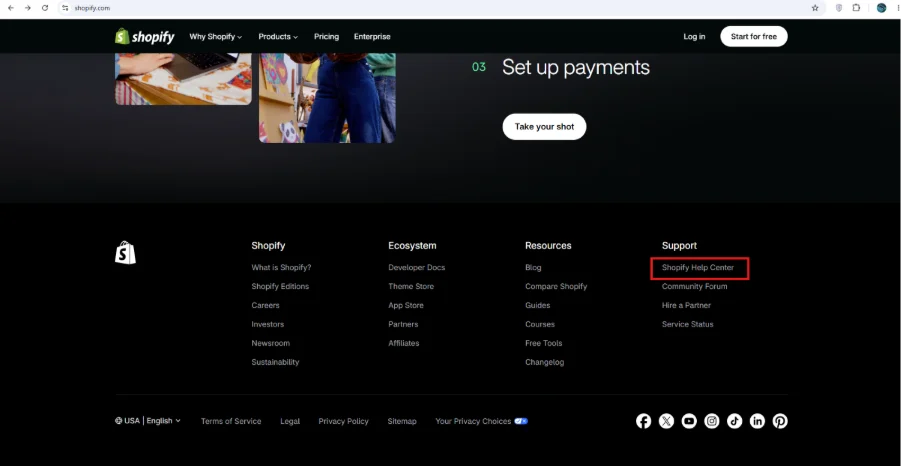
Step 3: Visit the Shopify Help Center.
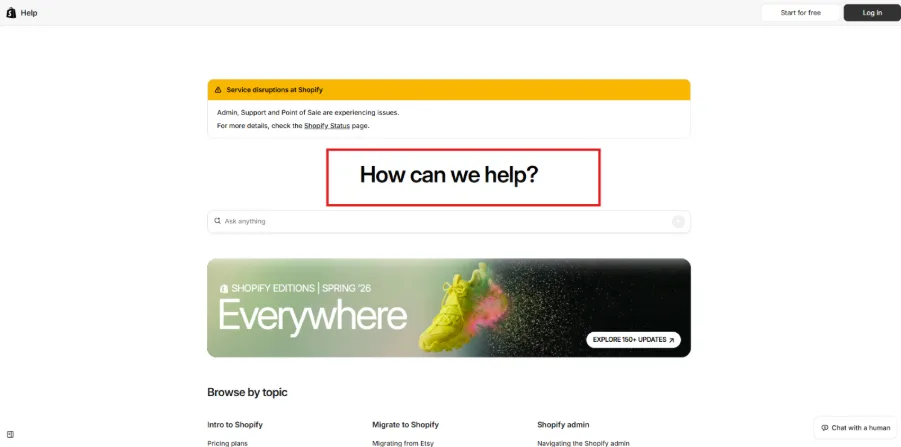
Step 4: Sign in to your Shopify account if required.
Step 5: Enter your question or describe the problem you are experiencing.
Step 6: Review the suggested resources provided by Shopify.
Step 7: If you still need assistance, select the option to chat with a human when available.
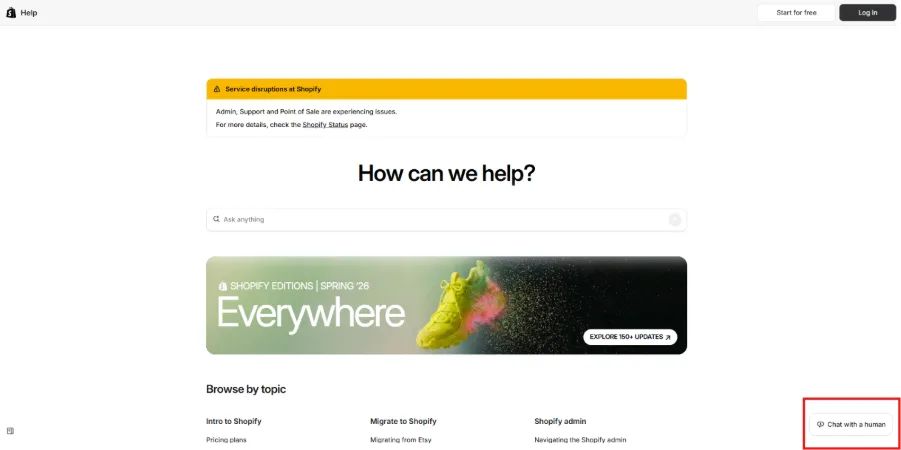
Step 8: Explain your issue to the support advisor and provide the relevant store or account details requested by Shopify.
Shopify states that chat support is available 24/7 for all plans, making it the most accessible option for merchants who need direct assistance.
Shopify Community Forum
If your issue is not account-specific, the Shopify Community can be another useful source of information. The forum brings together Shopify merchants, developers, Partners, and other ecommerce professionals.
You can search existing discussions to see whether someone has already experienced a similar problem. You can also create a new discussion if you cannot find a suitable answer.
Step 1: Visit the Shopify website.

Step 2: Scroll down to the bottom and, under the support section, click on “Community Forum”.
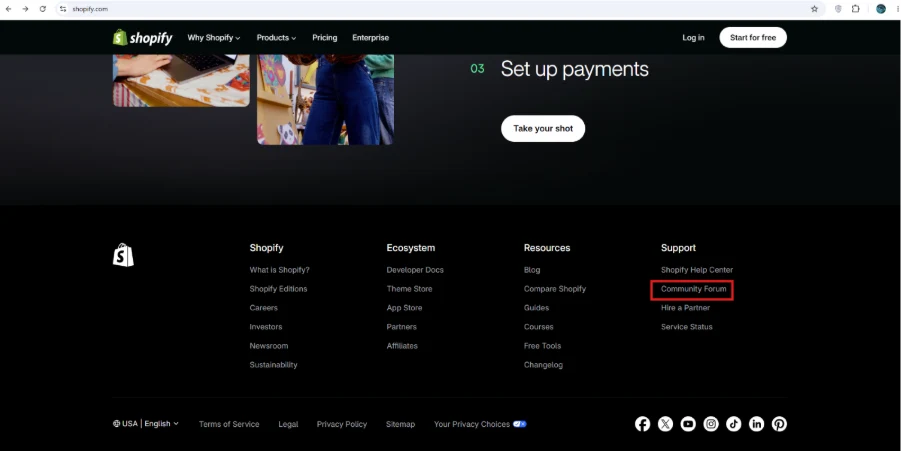
Step 3: Visit the Shopify Community.
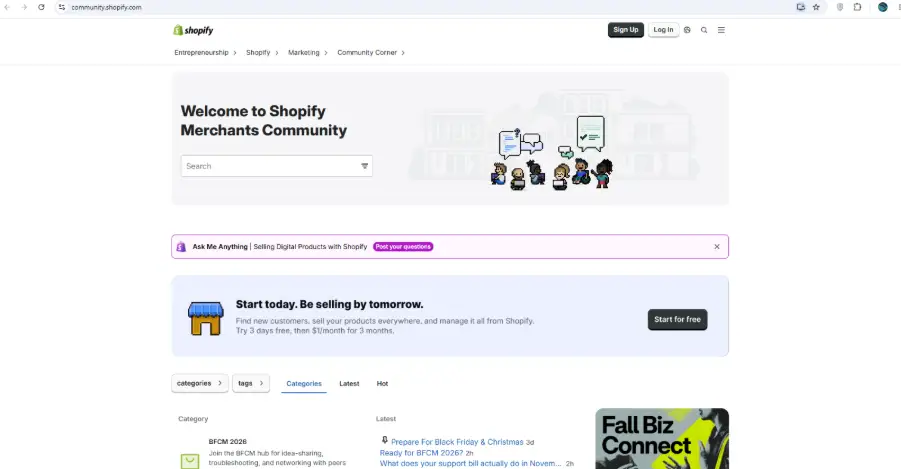 Step 4: Search for your question or problem using relevant keywords.
Step 5: Check existing discussions and solutions.
Step 6: If you cannot find an answer, create a new discussion describing your issue.
The Community is particularly useful for questions about themes, apps, customization, store design, coding, and general ecommerce practices.
Shopify Sales Support
If you are interested in Shopify’s plans or need help with a business or sales-related enquiry, you can use Shopify’s official Contact page.
Visit the Shopify Contact page and choose the relevant option for your enquiry.
For businesses considering Shopify Plus or other enterprise solutions, Shopify also provides dedicated sales and business resources.
Shopify Help Documentation
Not every issue requires contacting a support agent. Shopify’s Help Center contains detailed documentation that can help you troubleshoot common problems yourself.
You can find information about:
- Setting up your Shopify store
- Managing products and inventory
- Processing orders
- Payments and billing
- Shipping and delivery
- Shopify themes
- Shopify apps
- Domains
- Store settings
- Shopify POS
- Marketing and sales
- Account management
For many straightforward questions, searching the Help Center can be faster than waiting for support.
About Shopify
Shopify is an all-in-one ecommerce platform that helps businesses create online stores, manage products and inventory, process payments, and sell across online, social, and in-person channels. It offers built-in ecommerce features along with a large app ecosystem for extending store functionality.
Shopify Company Information
| Company Information | Details |
|---|---|
| Website | https://www.shopify.com/ |
| Headquarters | Ottawa, Ontario |
| Founded | 2006 |
| Founder | Tobias Lütke |
| CEO | Tobias Lütke |
| Industry | E-commerce platform |
Shopify Global Office Locations
| Country | City |
|---|---|
| Canada | Ottawa |
| United States | New York |
| Ireland | Dublin |
| Lithuania | Vilnius |
Shopify Pros and Cons
Pros
- ✓Easy to set up and use
- ✓Professional themes and templates
- ✓Large app ecosystem
- ✓Built-in inventory & order management
Cons
- ✕Monthly subscription costs
- ✕Extra costs for some apps
- ✕Transaction fees may apply
- ✕Advanced customization can require coding
Best Alternatives to Shopify
If you are looking for Shopify alternatives, several platforms offer different approaches to ecommerce, from easy website building to highly customizable and enterprise-focused solutions.
- Wix: Wix is an all-in-one ecommerce platform that lets businesses create online stores using customizable templates or AI-powered tools, while also managing products, payments, shipping, and marketing from one dashboard.
- WooCommerce: WooCommerce is an open-source ecommerce platform built for WordPress. It offers extensive customization and gives businesses greater control over their store, data, hosting, and features.
- BigCommerce: BigCommerce is a scalable ecommerce platform designed for B2C and B2B businesses, offering customizable storefronts, checkout tools, multichannel selling, and enterprise capabilities.
- Adobe Commerce: Adobe Commerce is an enterprise-focused ecommerce platform built for complex B2B and B2C operations, with advanced customization, AI-powered commerce, and multi-store capabilities.
- Sellfy: Sellfy is an ecommerce platform designed especially for creators, allowing them to sell digital products, physical products, subscriptions, and more without coding
Conclusion
Shopify provides several support options to help merchants resolve issues and find answers. For most store-related problems, the Shopify Help Center and 24/7 live chat are the best places to start. The Community forum can also help with general questions, customization, themes, apps, and advice from other Shopify users.
If you need help with sales or Shopify’s business solutions, you can use the official Contact page to find the appropriate channel. Using Shopify’s official support resources is recommended over relying on outdated phone numbers or unofficial contact details.
Frequently Asked Questions (FAQs)
Q1. How can I contact Shopify customer support?
Ans. You can contact Shopify Support through the Shopify Help Center. After signing in, you can use the available chat option to connect with a Shopify Support advisor.
Q2. Does Shopify offer 24/7 customer support?
Ans. Yes. Shopify currently provides 24/7 chat support for merchants on all plans.
Q3. How do I chat with a Shopify support agent?
Ans. Visit the Shopify Help Center, sign in to your account, describe your issue, and select “Chat with a human” when the option is available.
Q4. Does Shopify have phone support?
Ans. Shopify’s phone support is not available to every merchant. Phone support is provided for certain plans and services, including eligible Shopify Plus, Retail, and Shopify POS users.
Q5. Can I contact Shopify through email?
Ans. Email support is available for certain Shopify plans and services. Standard merchants are primarily directed to Shopify’s online support options, particularly live chat.
Q6. Is Shopify Community an official support channel?
Ans. Yes, Shopify Community is an official platform where merchants, developers, and Shopify Partners can discuss ecommerce questions and share solutions.
Q7. Where can I find Shopify’s official Help Center?
Ans. You can access the Shopify Help Center for guides, troubleshooting information, and support options.

manvinder Singh
https://www.hostingseekers.com
Manvinder Singh is the Founder and CEO of HostingSeekers, an award-winning go-to-directory for all things hosting. Our team conducts extensive research to filter the top solution providers, enabling visitors to effortlessly pick the one that perfectly suits their needs. We are one of the fastest growing web directories, with 500+ global companies currently listed on our platform.